Connect Trustpilot Account
Connecting your Trustpilot account to Statusbrew allows you to engage and respond to reviews on Trustpilot in real-time.
You must have a paid Trustpilot plan to complete this integration and Trustpilot Integration is only available in Statusbrew's Enterprise Plan.
Prerequisites
Active Trustpilot Business Account
Author User ID is the User ID from Account settings in Trustpilot
API Key (Client ID) & Client Secret from Applications page in Trustpilot
Admin access to your Statusbrew account
Only Trustpilot administrators can verify partnership permissions and generate API credentials.
How To Connect A Trustpilot Account?
Log in to your Trustpilot Business account at business.trustpilot.com.
Navigate to Integrations → Developers → APIs in your Trustpilot account.
Click Create new application, then enter your site domain.
Copy the API Key and Secret Key from the Applications page
Get your Author User ID which is the User ID from Account settings
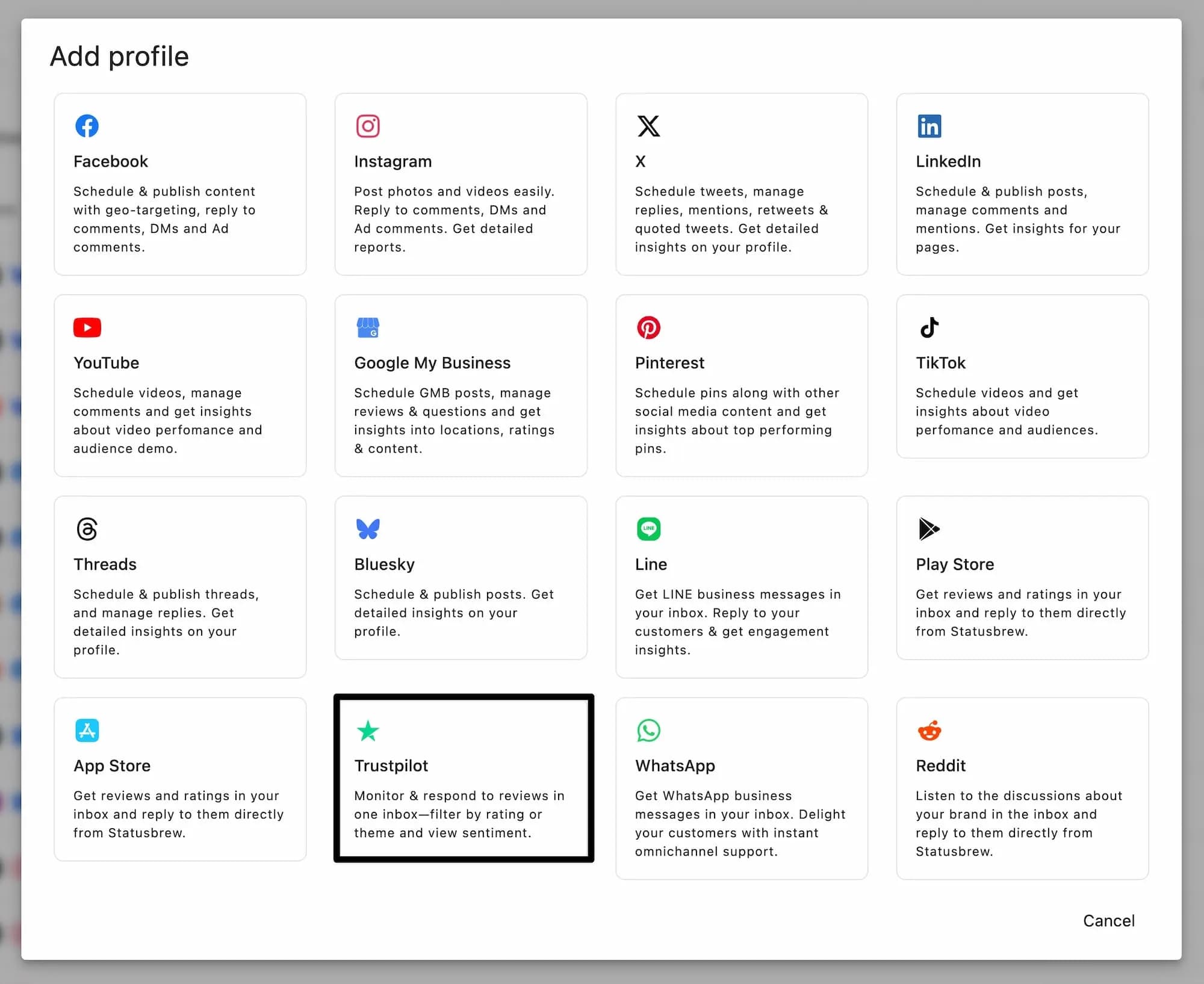
Log in to your Statusbrew account, then go to Settings → Profiles → Add profile → Trustpilot.
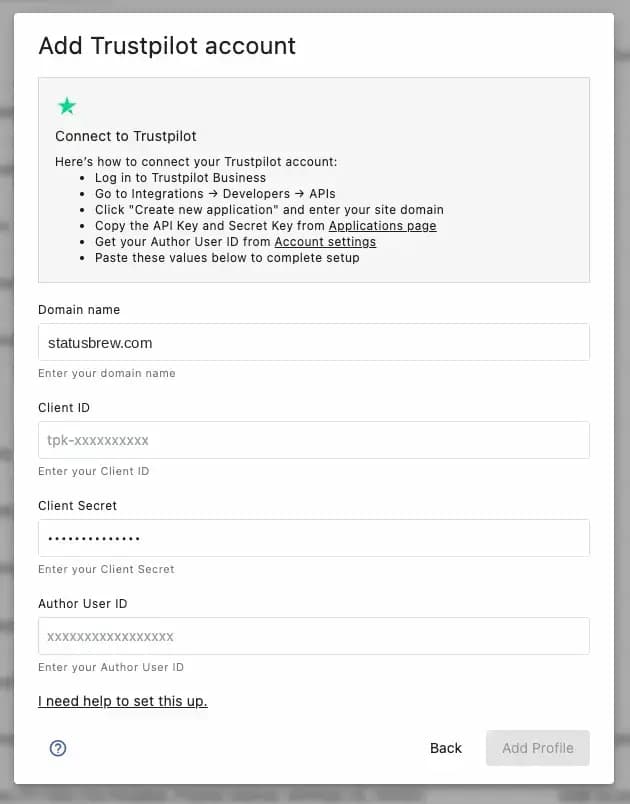
In the integration form, paste your Trustpilot domain name (For example, statusbrew.com as shown below), Trustpilot API Key in the Client ID field, and the Client Secret you generated.
Also add your User ID in Author User ID field.
Click Add Profile button.
Facing issues? Our support team is here to help! Chat with us for quick assistance.
How To Set Up Permissions For Team Members?
After connecting Trustpilot, you should configure which team members can access and manage reviews.
Go to Settings → Profiles → Select your connected Trustpilot profile.
Click the three-dot menu → Edit.
Under Permissions, assign access levels to users or user groups:
All permissions: Full access to all Statusbrew features for this profile
Engage Full Access: Can view, reply to, and manage all reviews
View conversations only: Can view reviews but cannot reply or take actions
Click Update to save changes.
How To View And Manage Trustpilot Reviews?
Once connected, all Trustpilot reviews appear in your Engage Inbox alongside reviews from other channels.
You can use filters to organize reviews:
Network: Filter by review platform to show only Trustpilot reviews (or combine with other platforms)
Star rating: Filter by 1-5 star ratings
Tags: Apply internal tags to categorize reviews
Date range: View reviews from specific time periods
Status: Filter by open, closed, or snoozed reviews
How To Respond To Trustpilot Reviews?
To reply to a review:
Click the reply icon on any review in your Engage Inbox.
Type your response in the reply window that opens.
Click Send to publish your reply.
What Else Can You Do With Reviews?
Beyond replying, you can:
Use macros: Save frequently used replies and apply them with one click
Add internal notes: Leave notes for your team that customers won't see
Tag reviews: Apply internal tags to categorize and filter reviews for reporting
Mark as complete: Mark reviews as resolved to track your team's progress
Assign to team members: Assign specific reviews to team members for follow-up
FAQs
How Much Review Data Does Statusbrew Backfill Upon Connection?
When you connect Trustpilot to Statusbrew, the system automatically backfills up to 10,000 of your most recent reviews.
How Often Does Statusbrew Sync Trustpilot Reviews?
Trustpilot reviews sync every hour. New reviews appear in your Engage Inbox within this time window.
Can I Delete Replies I've Posted Through Statusbrew?
Yes, you can delete replies to Trustpilot reviews that were posted through Statusbrew.
Can I Edit Replies I've Posted Through Statusbrew?
No, you cannot edit replies once they've been posted. We recommend reviewing your response carefully before sending.
Can I Organize Reviews By Brands, Products, Or Teams?
Yes. You can organize Trustpilot reviews using Statusbrew's workspace features:
Views: Create custom views to filter and organize reviews by specific criteria. Views work the same way across all review platforms in Statusbrew.
Team Inboxes: Route reviews to specific team inboxes using the Rule Engine. This lets you automatically distribute reviews to the right teams based on keywords, ratings, or other criteria.
Assignments: Assign individual reviews to specific team members for follow-up and tracking.
Can I Connect Multiple Trustpilot Domains To One Statusbrew Account?
Yes, you can connect multiple Trustpilot domains (representing different businesses) to a single Statusbrew organization with no limit.
Are There Volume Or Source Connection Limits?
No, there are no limits on the number of Trustpilot domains you can connect, the number of reviews you can sync or manage, or API rate limits that would affect performance.
How Does Statusbrew Handle Large Volumes Of Reviews?
Statusbrew scales to handle any volume of Trustpilot reviews, with no performance degradation regardless of review count.
Does The Integration Support Trustpilot's Flagging And Request Information Features?
No. Statusbrew supports only the aggregation and organization of Trustpilot reviews. Actions like flagging reviews as inappropriate or using Trustpilot's "Request Information" feature must be performed directly in Trustpilot.