Instagram Integration
Connect your Instagram Business account to Statusbrew to schedule posts, Reels, carousels and Stories, reply to comments and DMs, and track performance in one place.
Instagram is a photo and video-sharing social media platform owned by Meta Platforms. As a visual-first social media platform, it allows users to share photos, videos, and Stories and connect with followers worldwide.
With Statusbrew, you can take control of your Instagram account alongside other social platforms. Here's how Statusbrew's Instagram integration can help:
Who Can Do This?
Only space Admins and organization Owners in Statusbrew can add an Instagram profile from Settings → Profiles. You also need to be an admin on the Facebook Page or Meta Business Manager linked to the account. Statusbrew connects only Instagram Business (Professional) accounts.
How To Connect Your Instagram Business Account With Statusbrew?
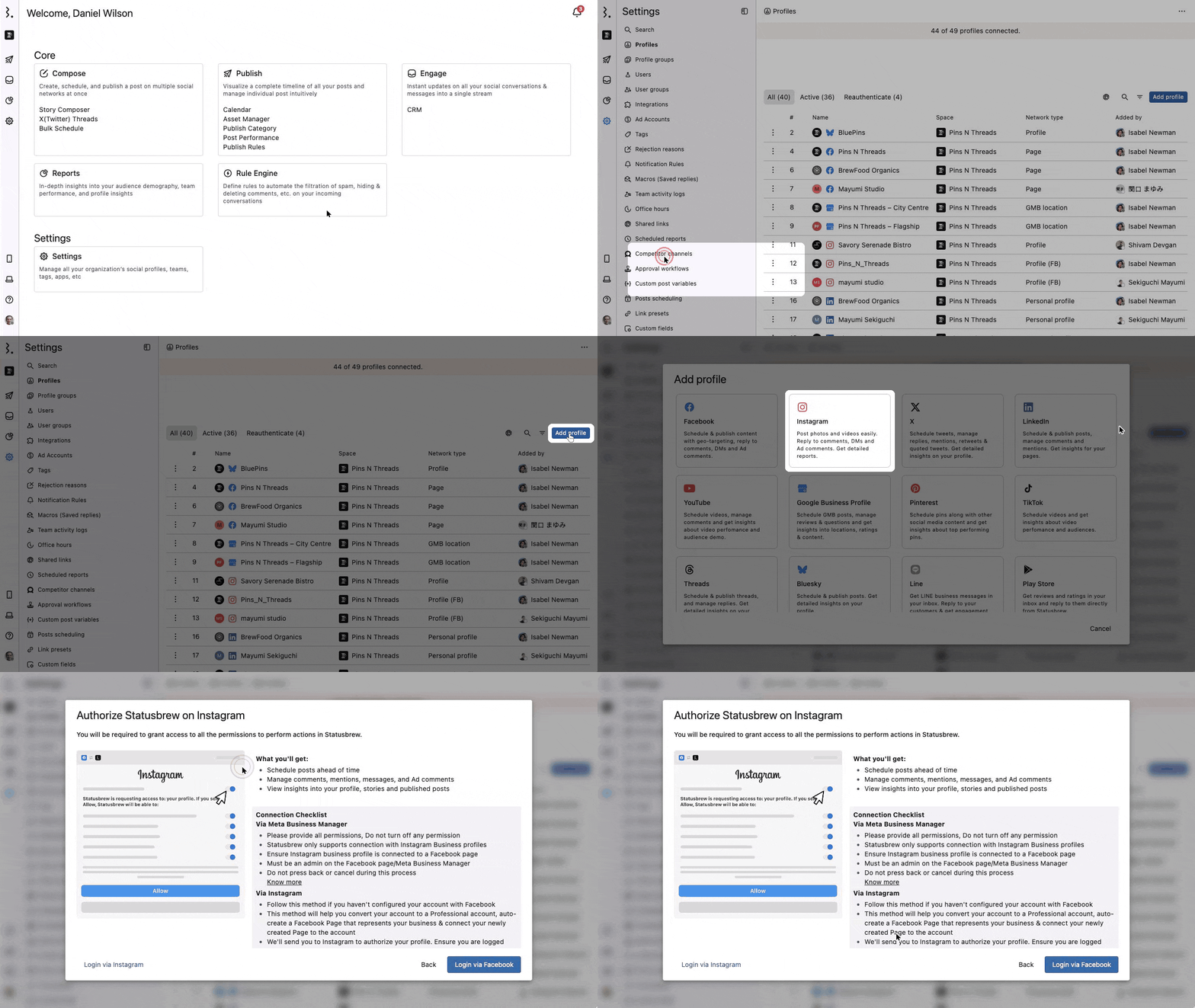
Go to Settings → Profiles → Add profile → Instagram.
In Authorize Statusbrew on Instagram, click Login via Facebook if your Instagram Business account is linked to a Facebook Page, or Login via Instagram if it isn't.
Give every permission Instagram or Facebook asks for, and don't press back or cancel during the process.
For detailed guidance, check out these articles:
Login Via Facebook Vs. Login Via Instagram
Both methods let you schedule posts and reply to comments and DMs.
Login Via Facebook

Use this if your Instagram Business account is linked to a Facebook Page. These features work only with Login via Facebook:
Liking Instagram comments in Engage
Instagram mentions and posts you are tagged in, in Engage
Adding the profile to Brand Keywords in Listening
The Post Reposts metric in Reports
In Settings → Profiles, the Network type column shows Profile (FB) for accounts connected this way.
Login Via Instagram

Use this if your Instagram account isn't linked to a Facebook Page. The features listed under Login Via Facebook aren't available.
In Settings → Profiles, the Network type column shows Profile for accounts connected this way.
What Can You Do With Instagram In Statusbrew?
Once your Instagram profile is connected, you can:
Share a Reel as a trial reel (accounts with 1,000+ followers)
Manage multiple Instagram profiles from one platform
Respond to comments on organic posts and ads, messages, and mentions
Hide or delete Instagram comments and ad comments
Respond to a Instagram comment or ad comment with private reply
Like a comment, ad comment, or review
Track performance, engagement, and audience growth
Add a customized BrewLink in Bio to your Instagram bio
Tag users or products in a single video post, single image post, or multiple images in a carousel post
Add collaborators to Instagram posts
Schedule first comment with your Instagram posts
Turn off comments on a post with Disable comments
Label a post as AI-generated content
Publish directly, or get a reminder on your phone with Publish via mobile reminders
Boost Instagram posts from Compose with the Boost post icon
Monitor hashtag activity on Instagram
Filter out spam and negative comments automatically from your owned media.
FAQs
Should I Connect With Facebook Or With Instagram?
Use Login via Facebook if your Instagram Business account is linked to a Facebook Page. It unlocks comment likes, mentions and media tags in Engage, Brand Keywords and the Post Reposts metric. Use Login via Instagram only if you haven't linked a Facebook Page.
Can I Connect A Personal Instagram Account?
No. Statusbrew connects only Instagram Business accounts. The Login via Instagram method can convert your account to a Professional account and create a Facebook Page for it during setup.
Why Can't I See The Like Option On Instagram Comments?
Comment likes work only when the profile is connected with Login via Facebook. Reconnect the profile that way to like comments in Engage.
Why Aren't Posts I'm Tagged In Showing In Engage?
Instagram mentions and media tags sync only for profiles connected with Login via Facebook. Check the Network type in Settings → Profiles; if it says Profile, reconnect with Facebook.
Why Aren't My Instagram DMs Showing Up In Engage?
DMs sync only when Allow access to messages is on in the Instagram app. On your phone, open Instagram → Settings → Account type and tools → Messaging tools → Message controls and turn it on.
How Many Collaborators Can I Add To A Post?
Up to 5. Add them under Instagram options → Collaborators in Compose.
Why Is My Follower Count Showing Zero?
Statusbrew starts tracking followers from the day you connect the profile and can't load older data. The count appears after the next daily sync.
Why Is Actual Growth Showing 0?
Instagram doesn't share Actual Growth for profiles with fewer than 100 followers. It starts showing once the profile passes 100.