Connect And Use LinkedIn With Statusbrew
Connect LinkedIn Pages and personal profiles to Statusbrew to schedule posts and polls, manage comments and measure performance in one place.
Statusbrew's LinkedIn integration lets your team plan and publish LinkedIn content, reply to comments and report on results alongside your other networks.
Who Can Do This?
Anyone who can add profiles in Settings → Profiles can connect LinkedIn. On LinkedIn, the person connecting a Page must be an admin of that Page.
Connect LinkedIn To Statusbrew
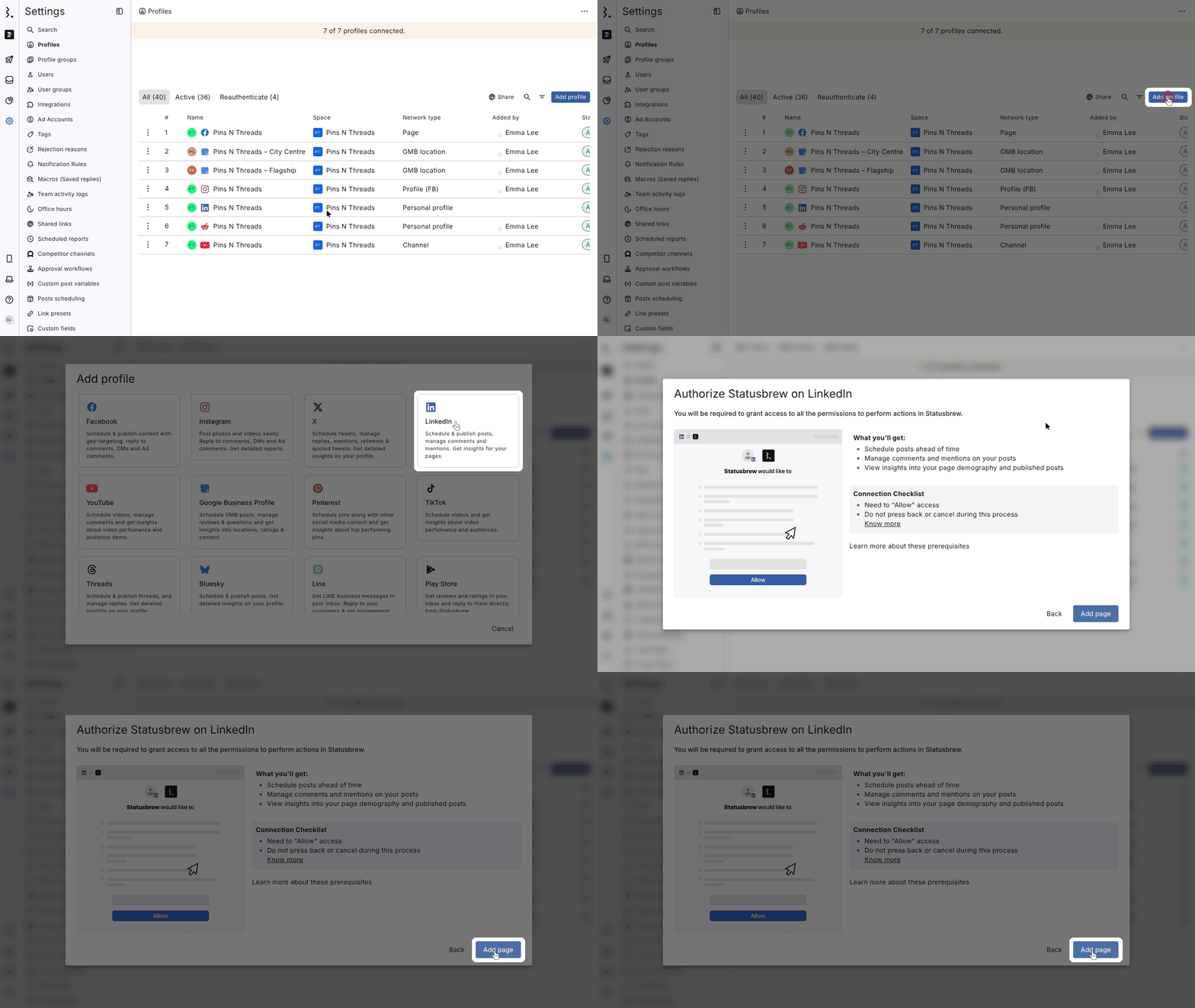
Go to Settings → Profiles and click Add profile.
Choose LinkedIn.
In Authorize Statusbrew on LinkedIn, click Add page.
Sign in to LinkedIn, click Allow and choose the Pages or profile to connect.
Warning: Don't press back or cancel while LinkedIn is open, and allow every permission. Otherwise the connection doesn't finish.
What You Can Do With LinkedIn In Statusbrew
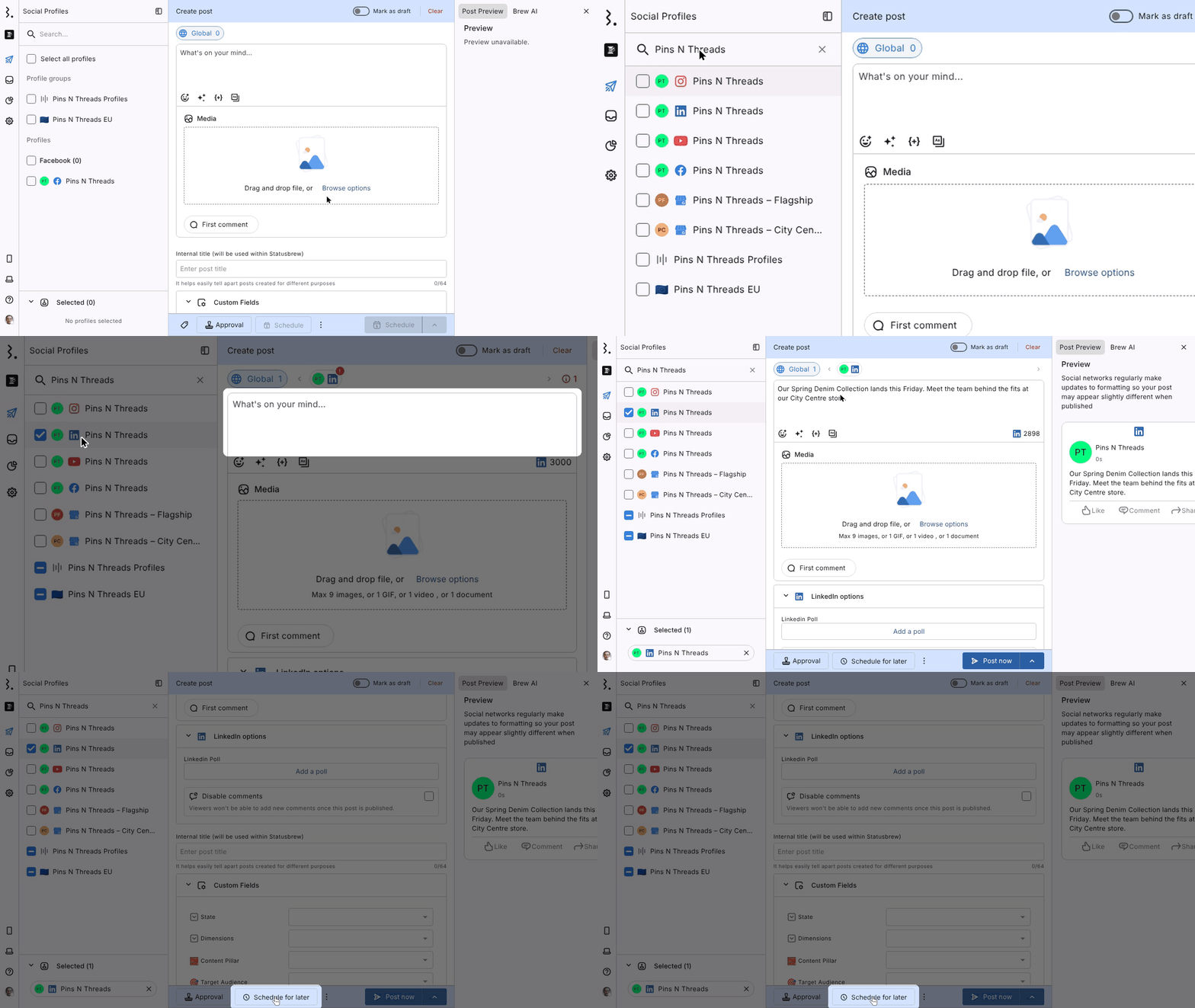
Schedule LinkedIn posts (up to 3000 characters, with up to 9 images, or 1 GIF, 1 video or 1 document)
Schedule LinkedIn polls (LinkedIn options → Add a poll)
Turn off comments on a post (LinkedIn options → Disable comments)
Schedule a first comment with your post
Target posts to a specific audience
Manage several LinkedIn Pages and profiles from one place
Reply to, react to and delete comments in Engage
Filter out spam and negative comments automatically
Measure the performance of your LinkedIn Pages and LinkedIn ads
Personal Profiles And Pages
You can connect LinkedIn Pages and personal profiles, for example your CEO's. Each one is added as its own profile.
Note: For personal profiles you get profile-level metrics (impressions, engagement, engagement rate, followers and follower growth), not post-level analytics.
Limitations
LinkedIn ad comments don't sync to Engage.
Statusbrew syncs comments and mentions on your own Page's posts, not mentions of your brand in comments on other people's posts.
A Page can only tag people who follow the Page; a personal profile can only tag its own connections.
Video views come through only when a Super admin of the Page connected it. If a Content admin connected it, video views show 0.
FAQs
Can I See Post-Level Analytics For A Personal LinkedIn Profile?
No. Personal profiles show profile-level totals only. Connect a LinkedIn Page for post-level analytics.
Why Do My LinkedIn Video Views Show 0?
LinkedIn shares video views only with Super admins. Ask a Super admin of the Page to reauthenticate it: Settings → Profiles → More (three dots) next to the Page → Reauthenticate.
Why Can't I Tag Someone In My LinkedIn Post?
A Page can only tag people who follow it, and a personal profile only its connections. You also can't tag your own profile.
Why Does A Link Preview Appear After I Removed It?
LinkedIn can build its own preview from the first link in the text after publishing. To avoid it, put the link in the first comment.
Why Is A Post I Scheduled In LinkedIn On The Wrong Date In Statusbrew?
For posts scheduled natively in LinkedIn, LinkedIn sends the date the post was created, not the future publish date. Posts scheduled from Statusbrew show the right date.