Understanding Time vs Lifetime Metrics (Post vs Profile-Level)
If your post metrics don’t match your profile metrics, nothing is broken. You’re likely comparing lifetime (post-level) data with reporting period (profile-level) data. This article explains the difference in simple terms with examples and visual infographics, so you can confidently interpret your reports.
What You’ll Need
Access to Reports
At least one connected social profile
Reporting available on Standard plan and above
Post-Level Metrics (Usually Lifetime)
Post-level metrics are specific to a post.
Most networks return these as lifetime totals — meaning they include all engagement from the moment the post was published.
Post-Level = Lifetime
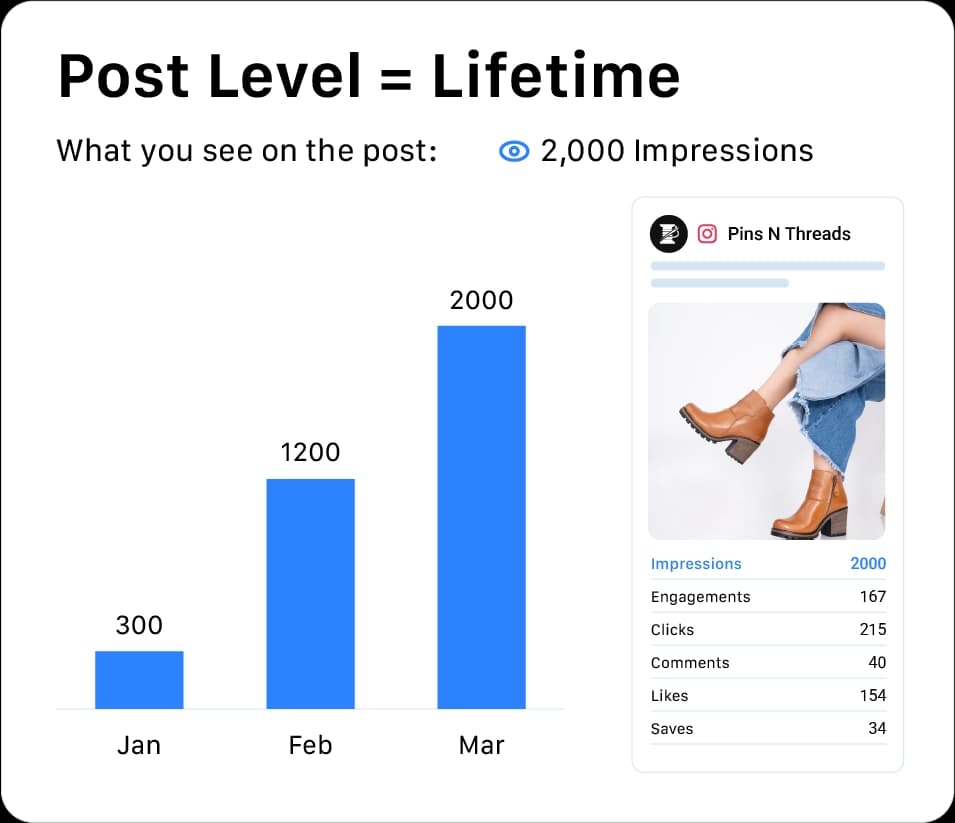
These numbers:
Do NOT reset
Do NOT change when you change your reporting date range
Continue increasing as people interact
Post-Level (Lifetime) Metrics
Post impressions
Post reach
Post likes/reactions
Post comments
Post shares
Post clicks
Video views (per post)
Profile-Level Metrics (Reporting Period)
Profile-level metrics represent your entire account.
These depend on the date range selected in Reports.
If you select:
Last 7 Days
Last 30 Days
Custom Range
Only the engagement that happened during that time is counted.
Profile-Level = Reporting Period
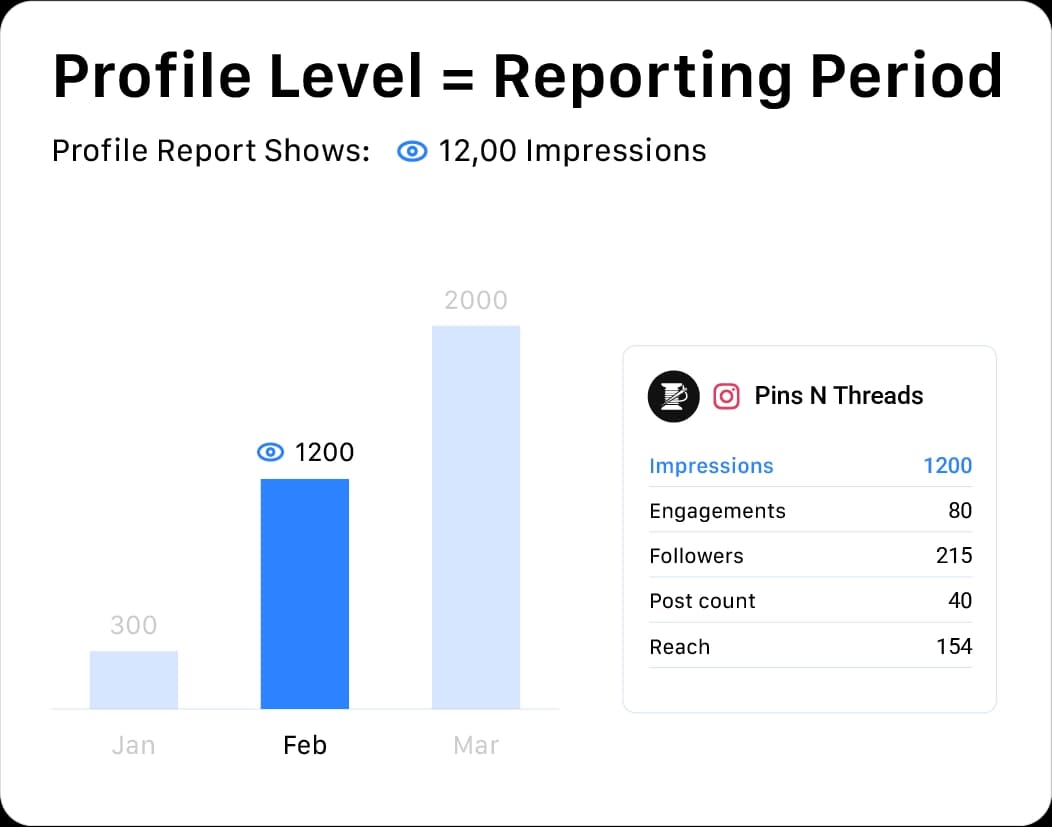
If you change the date range, these numbers change.
Why The Numbers Don’t Match
Let’s say:
Post | Lifetime Impressions |
Post A | 2,000 |
Post B | 1,500 |
Post C | 1,000 |
Total lifetime impressions = 4,500
But your profile report (Last 30 Days) shows:
2,800 impressions
This happens because:
Lifetime includes all historical engagement
Reporting Period includes only engagement within the selected timeframe
Not all impressions occurred inside the current reporting window
Nothing is incorrect — you’re comparing two different data sets.
Comparison
Quick Reference Table
Feature | Post-Level Metrics | Profile-Level Metrics |
|---|---|---|
Applies To | Individual post | Entire profile |
Data Type | Lifetime | Reporting Period |
Affected by date range | No | Yes |
Changes when date range changes | No | Yes |
Example | Post impressions = 2,000 | Profile impressions (Last 30 Days) = 1,200 |
Verification
Before comparing numbers:
Check your selected date range
Confirm whether you're viewing post-level or profile-level data
Ensure you're comparing the same data type (Lifetime vs Reporting Period)
FAQs:
Why does my profile data not match the post data I am seeing in reports?
This usually happens because different reports rely on different data methods.
Reporting Period (profile-level)
data includes only engagement that occurred within the selected date range.
Lifetime (post-level)
data includes all engagement from a post’s publish date onward — even if it happened outside that range.
Example: You may see:
300 impressions in a Reporting Period report
500 impressions in a Lifetime report
That’s because 200 of those impressions happened outside your selected date range — but are still included in Lifetime totals.
What is the difference between Lifetime and Reporting Period data?
Lifetime
includes all metrics from a post’s publish date onward.
Reporting Period
includes only metrics that occurred during the selected date range.
How is Lifetime (Publishing Period) data calculated?
Lifetime data includes every interaction with a post from the time it is published — regardless of your report date range.
If a post continues to receive engagement months later, those interactions are added to the lifetime total.
How is Reporting Period data calculated?
Only engagement that occurs within the selected date range is counted.
If your report is set to:
March 1–March 31
Only interactions that happened during those dates are included — even if the post was published earlier.
Why do my post's metrics change over time?
Post performance grows as users continue interacting with it.
If you’re using Lifetime data, those metrics will increase whenever new likes, comments, shares, or impressions happen.
Which report should I use to see the performance of my posts during a specific campaign?
Use Reporting Period (profile-level) data.
It shows performance limited to your campaign dates.
Which report should I use to see the overall performance of my posts?
Use Lifetime (post-level) data.
It shows total engagement from the publish date onward.
Why are likes in the post-level report not matching likes in the profile report?
You’re comparing values from two different data sets:
Post-level report = Lifetime data
Profile-level report = Reporting Period data
They are not meant to match.
Lifetime includes all engagement from publish date onward. The Reporting Period includes only engagements within the selected timeframe.
Can I see a daily breakdown of my post's performance?
Yes — in reports that use Reporting Period (profile-level) data.
By adjusting the date range (for example, in a Profile Performance Report), you can see daily breakdowns for metrics like impressions or engagement.
Lifetime (post-level) data shows cumulative performance from the publish date onward and does not provide daily breakdowns.
What do “post-level” and “profile-level” mean?
Post-level
refers to metrics tied to individual posts, such as lifetime engagement.
Profile-level (or page-level)
refers to metrics aggregated at the profile level during a specific reporting period, such as total impressions or reach.