Track Pin Performance With Pinterest Metrics
Pinterest metrics show how often your pins were seen, clicked and saved, and how many people left Pinterest for your website, in Statusbrew Reports.
Use Pinterest metrics to gain in-depth performance analysis and expand your reach.
Pinterest metrics are calculated in UTC (Coordinated Universal Time).
Who Can Do This?
Anyone who can edit a report can add Pinterest metrics to a widget. You need a Pinterest profile connected in Settings → Profiles for the metrics to show data.
Add A Pinterest Metric To A Widget
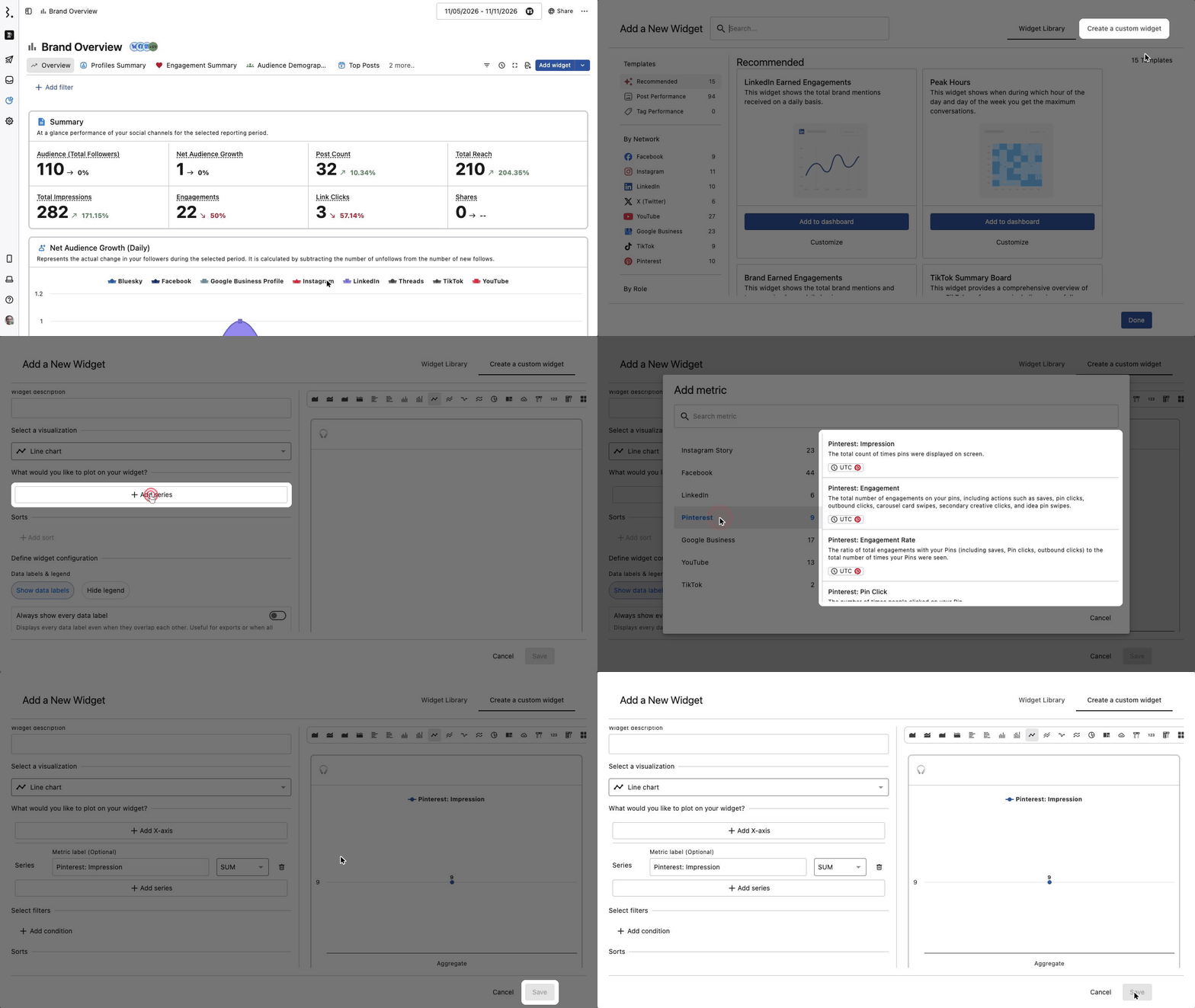
Go to Reports and open the report you want to add the metric to.
Click Add widget → Create a custom widget.
Click Add series.
In Add metric, type Pinterest in Search metric. The 9 Pinterest metrics show at the top of the results.
Click a metric, for example Pinterest: Impressions. The widget preview shows its value straight away.
Add a Widget name, then click Save.
Note: There is no Pinterest group in Add metric. Metrics are grouped by what they measure, so Pinterest: Impressions sits under Awareness and the other 8 Pinterest metrics sit under Engagement.
Tip: To start from a ready-made Pinterest widget instead, click Add widget and pick Pinterest under By Network in the Widget Library.
Pinterest Metrics
Metric Name | Description | Group in Add metric |
|---|---|---|
Pinterest: Impressions | The total count of times pins were displayed on screen. | Awareness |
Pinterest: Engagement | The total number of engagements on your pins, including actions such as saves, pin clicks, outbound clicks, carousel card swipes, secondary creative clicks, and idea pin swipes. | Engagement |
Pinterest: Engagement Rate | The ratio of total engagements with your Pins (including saves, Pin clicks, outbound clicks) to the total number of times your Pins were seen. | Engagement |
Pinterest: Pin Clicks | The number of times people clicked on your Pin. | Engagement |
Pinterest: Pin Click Rate | The total number of clicks on your Pin divided by the total number of times your pins were on screen. | Engagement |
Pinterest: Outbound Clicks | The count of actions leading users to destinations outside Pinterest. | Engagement |
Pinterest: Outbound Click Rate | The total number of clicks to the destination URL associated with your pin divided by the total number of times your pins were on screen. | Engagement |
Pinterest: Saves | The number of times people saved your Pin to a board. | Engagement |
Pinterest: Save Rate | The total saves of your Pins divided by the total number of times your Pins were on screen. | Engagement |
What Happens After
The widget preview shows the metric as soon as you pick it, before you save.
After you click Save, the widget appears on the report for everyone who can see that report.
The metric follows the report's date range and filters.
Nothing is added to the report if you click Cancel.
FAQs
Can I see how each individual pin performed?
No. Pinterest's API does not share post-level metrics, so you cannot track individual pins, or pins grouped by a tag or campaign. The metrics above are totals for your Pinterest profile. Use the Pinterest Overview report for your Pinterest analytics.
Which time zone do Pinterest metrics use?
UTC, for every Pinterest metric. The time zone shows next to each metric in the Add metric list.
What Is The Difference Between Pin Clicks And Outbound Clicks?
Pinterest: Pin Clicks counts clicks on the pin itself. Pinterest: Outbound Clicks counts clicks that take people off Pinterest to the pin's destination URL, such as your website.
Why Can't I Find A Pinterest Category In The Metric List?
The Add metric list groups metrics by what they measure, such as Awareness and Engagement, not by network. Type Pinterest in Search metric to see every Pinterest metric at once. Your existing widgets and reports are not affected.