External Approvers in Statusbrew
External approvers let clients, legal teams and other people outside your team approve or reject your posts in Statusbrew without taking a user seat.
You add an external approver by entering their email address in a step of an approval workflow. When a post reaches that step, they review it on their own approvals page and approve, reject or suggest edits.
Who Can Do This?
Plan: Approval workflows, including external approvers, are available on Premium and above plans.
Setting up workflows: Admin and Owner users manage approval workflows in Settings → Approval workflows.
Sending posts for approval: Anyone who creates posts can pick a workflow in Compose. Team members with Create Post permission on a profile must send their posts for approval. Team members with Full Publishing permission can choose No Review or a workflow.
External approvers: They don't need a Statusbrew user seat. They can review, approve, reject, comment and suggest edits on posts sent to them, nothing more.
What Is an External Approver?
An external approver is someone outside your Statusbrew team who approves posts as part of an approval workflow. Entering their email in a workflow step adds them as a guest user in your account. An Owner can also add them first in Settings → Users → Add users (arrow) → Add guest user.
They can:
Review: See the posts and Post Groups waiting for their approval.
Approve or reject: Approve or reject a post or a whole Group, with an optional comment when rejecting.
Suggest edits: Propose a caption change on a single post.
Comment: Leave feedback for your team.
Your internal comments and earlier revisions stay hidden from external approvers. They only see what you share with them. To learn how guest accounts work across Statusbrew, read how guest users work in Statusbrew.
How Do I Add an External Approver to a Workflow?
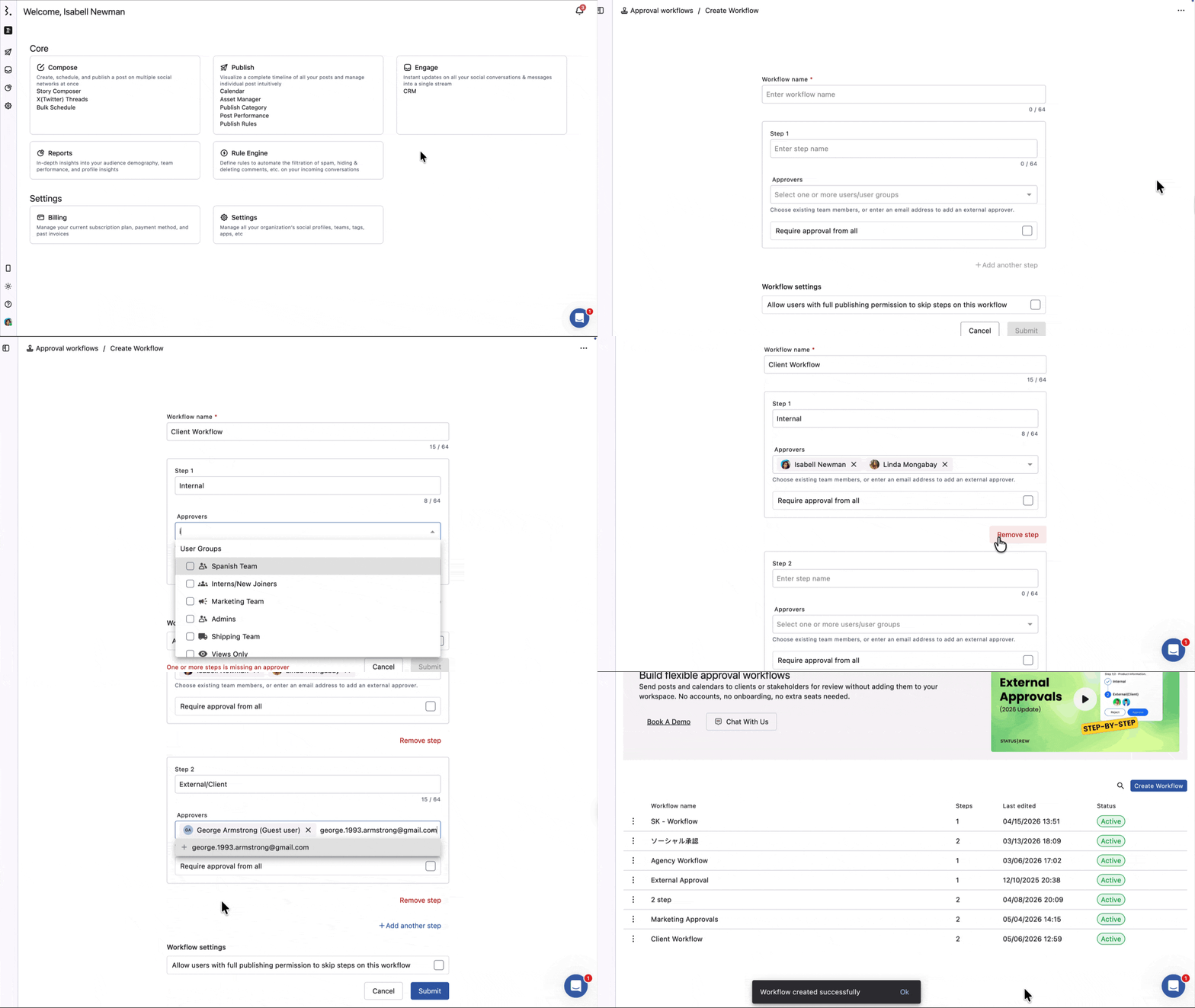
Go to Settings → Approval workflows.
Click Create Workflow, or click More (three dots) on an existing workflow and choose Edit.
Give the workflow a Workflow name and name the step.
In Approvers, type the email address of the external contact and press Enter, or click an existing guest in the dropdown. It's added as a chip marked (Guest user).
Optional: tick Require approval from all if every approver in this step must approve.
Click Submit.
You can mix team members and external approvers in the same step, or give external approvers a step of their own.
How Do I Send a Post to an External Approver?
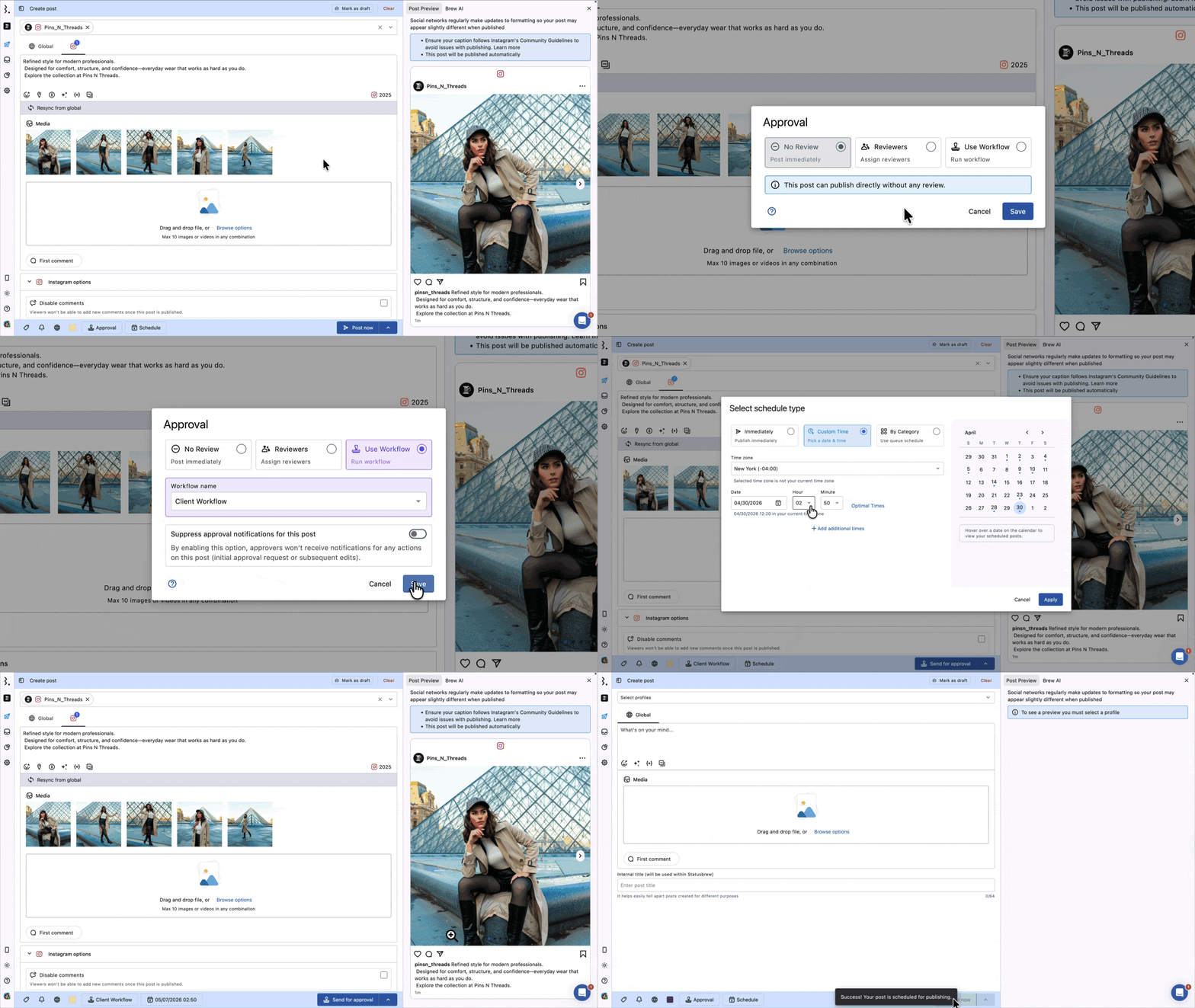
In Compose, click the Approval button in the bottom bar.
Choose Use Workflow.
Pick the workflow that includes your external approver from the Workflow name dropdown.
Click Save, then schedule the post.
A post for two or more profiles is saved as a Post Group, with one post per profile, unless you pick Separate posts in Compose, in which case each post goes through the workflow on its own. A post for a single profile is saved as a normal post, not a Group. A Group goes through the workflow together.
How Do I Get Internal Approval Before the Client Sees a Post?
Use one workflow with more than one step. You don't need to switch posts between two workflows.
Step 1: Add your internal reviewers.
Step 2: Add your client's email address.
Once Step 1 approves a post, it moves to Step 2 and the client can review it.
How Do External Approvers Sign In?
When a post reaches their step, the external approver gets an email. The link in that email is a magic link that signs them straight in to their approvals page. No password needed.
They can also go to external.statusbrew.com and sign up or sign in with the same email address you added to the workflow.
They must use that exact email. Someone who opens a shared link without signing in can see the posts but can't approve or reject them.
How Do External Approvers Review Posts?
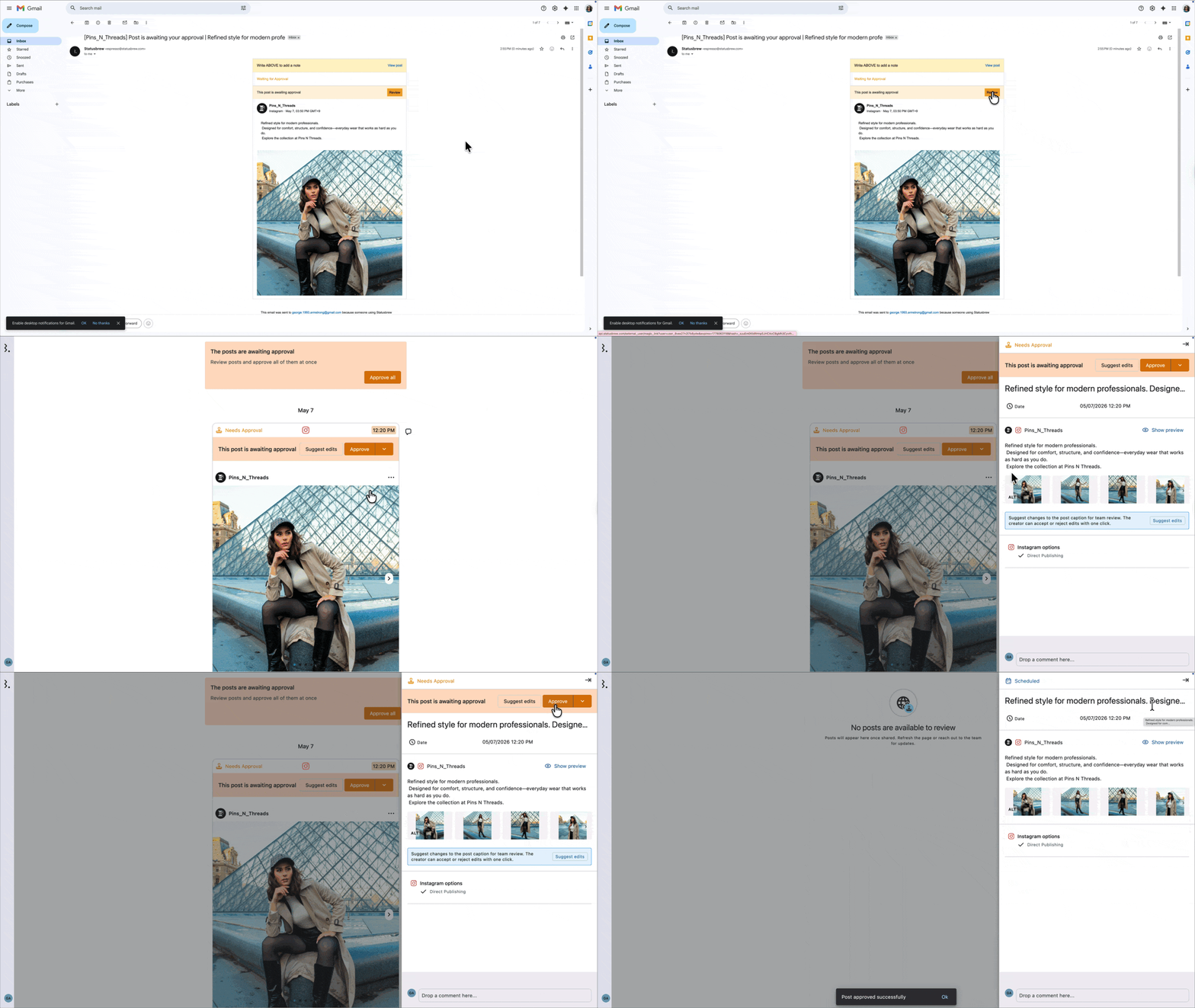
The external approvals page (external.statusbrew.com) has a Classic view / Table view toggle at the top right. The browser remembers the last view they picked.
Each Post Group waiting for approval shows as one block:
Group header: The Group's name, schedule and profiles, with one Approve and one Reject for the whole Group.
Post previews: A preview of every post in the Group. Clicking a preview opens that post.
Suggest edits: A button on each post to propose a caption change for that post only.
Comments: One comments thread for the whole Group.
Approval is all or nothing for a Group. Approving it approves every post in it. Rejecting it opens the Reject Group dialog, where they can add an optional comment that applies to every post, and all of the Group's posts move to Rejected.
Approve all at the top of the page approves every pending post and Group at once.
Suggest edits only shows on posts awaiting approval, and isn't available for Stories. When your team accepts a suggestion, that post leaves its Group, so the Group's approval no longer covers it. Read more about suggesting edits to a post awaiting approval.
What Can't External Approvers Do?
No editing: They can't open a post in Compose or edit it. They can only suggest caption changes.
No rescheduling: They can't change when a post goes out.
No bulk selection: They can't tick several posts and act on them together. Approve all is the only way to approve more than one item at a time.
No per-post approval inside a Group: They approve or reject the whole Group.
No dashboard access: They can't create posts, publish, or see anything you haven't sent them.
How Does Require Approval From All Work With External Approvers?
Off: The first approver in the step to act completes it. If a team member approves first, the external approver no longer sees Approve or Reject for that post, and the other way round.
On: Every approver in the step, including external approvers, must approve before the post moves on. If any one of them rejects, the post or Group is rejected right away.
If your client must always sign off, either tick Require approval from all or put the client in a step of their own.
How Do Notifications Work for External Approvers?
External approvers get an email when a post is waiting for them. They don't need to check Statusbrew to find out.
If you turn on Suppress approval notifications for this post in the Approval dialog in Compose, approvers don't get the approval request or later update emails for that post. Hourly or daily reminders for pending approvals are still sent. Send your approver the link yourself.
How Do I Remove an External Approver?
Go to Settings → Approval workflows.
Click More (three dots) on the workflow and choose Edit.
Click the x on the email address in the step's Approvers.
Click Submit.
FAQs
Can I Have My Client Approve Posts Before They Go Live?
Yes. Add your client's email address as an approver in a workflow step in Settings → Approval workflows, then pick that workflow in Compose. The post only gets scheduled once your client approves it. This needs a Premium or above plan.
Does an External Approver Need a Statusbrew Account or Seat?
No seat. They sign in at external.statusbrew.com with the email you added, or straight from the magic link in their approval email.
Why Can't My Client See the Approve or Reject Buttons?
Check these in order:
Same email: Your client must sign in with the exact email added to the workflow.
Post uses the workflow: The post must be sent with Use Workflow and a workflow that includes your client.
Right step: In a multi-step workflow, the post must have reached your client's step.
Step already done: If Require approval from all is off and someone else in the step already approved or rejected the post, your client won't see the buttons.
Public shared link: Someone viewing a shared link without signing in can see posts but can't approve them. Invite your client's email in the link settings.
Do I Have to Email My Client When a Post Is Ready?
No. Statusbrew emails them when a post reaches their step. The only exception is when you turn on Suppress approval notifications for this post. Then you need to tell them yourself.
Can My Client See Our Internal Comments and Revisions?
No. External approvers only see the post and the comments you share with them.
Can My Client Approve Some Posts in a Group and Reject Others?
No. A Group is approved or rejected as a whole. To change one post, your client can use Suggest edits on that post instead of rejecting the Group.
Will My Client Know if We Accepted Their Suggestion?
They're told by email. The external approvals page (external.statusbrew.com) doesn't show what happened to their suggestion.
Can I Add More Than One External Approver?
Yes. Enter each email address in Approvers. Use Require approval from all if each of them must approve.
Can I Still Pick Individual Reviewers Instead of a Workflow?
No. New posts use No Review or Use Workflow. To have one person approve, create a workflow with a single step and that person as the approver.