Understanding AI Credits
Every AI feature in Statusbrew is billed in credits. Your plan includes a monthly allowance, you can buy more at any time, and auto-recharge can top you up automatically, so AI never pauses mid-campaign.
How Many AI Credits Do I Get?
Your plan sets how many credits you get each month.
Plan | AI credits per month |
|---|---|
Lite | 2,000 |
Standard | 5,000 |
Premium | 10,000 |
Enterprise | Custom |
Plan credits reset each month when your subscription renews, so unused plan credits do not carry forward. Credits you buy are different: they roll over from month to month and stay on your account until you use them.
Trials work the same way. You get the monthly allowance of the plan you are trialing.
As a rough guide, most AI actions cost between 2 and 5 credits. The exact cost changes with the size of each request, so use the range for planning rather than budgeting to the credit.
What Uses AI Credits?
Every AI feature in Statusbrew draws on the same balance, and we regularly add new ones. Rather than memorizing a list, it helps to know the two ways credits get spent.
AI You Trigger
Credits come off your balance at the moment you ask for something. For example:
Generating, rewriting, or translating a caption with Brew AI in Compose
Rephrasing a reply or adjusting its tone with AI Assistant in Engage
Summarizing a long conversation
Building an Engage view, an Engage rule, or a report widget from a plain-language description
Generating a brand voice from your website
AI That Runs On Its Own
Once switched on, these keep spending credits without anyone clicking. For example:
Let AI reply in your Engage rules, which writes a fresh reply to every matching conversation
Describe intent keyword matching, which reads incoming messages by meaning rather than exact keywords
AI Review Instructions, which check every post sent for approval
New AI features fall into one of these two groups and draw on the same balance. If a feature is labeled AI, assume it uses credits.
Automatic features are the fastest way to spend credits. A Let AI reply rule running across all your profiles writes a new reply to every matching conversation, so a busy inbox gets through credits quickly. Test a rule on one profile first and watch your usage for a few days before turning it on everywhere.
Where To Find Your AI Credits
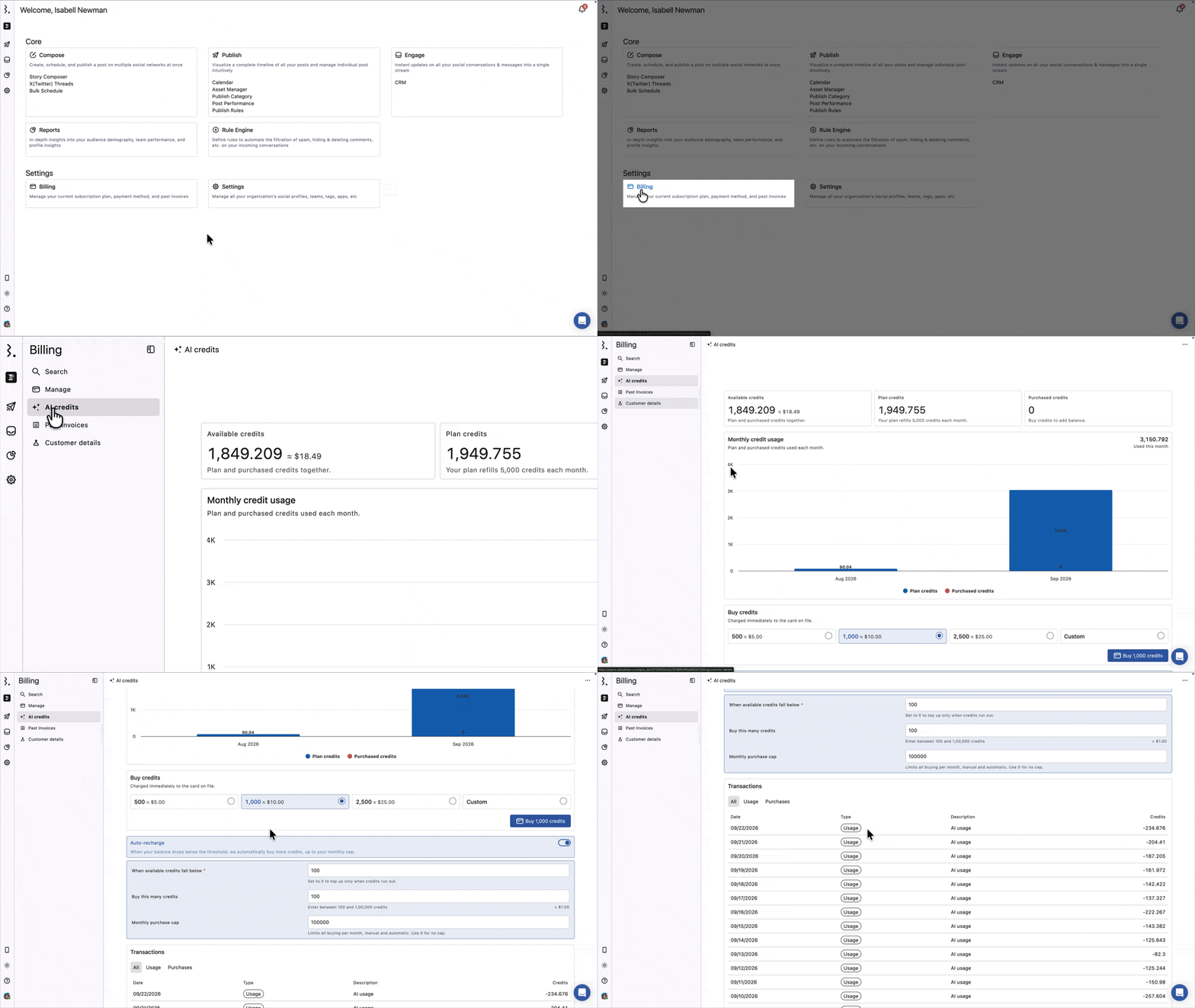
From the Statusbrew dashboard, go to Billing, then select AI credits from the left sidebar.
The page has five parts, top to bottom: your balances, the Monthly credit usage chart, Buy credits, Auto-recharge, and Transactions. The rest of this article follows them in that order.
On a trial you will not see any of this. The page shows Add a payment method instead. Your credits are still there and AI features still work, you just cannot see your balance, your usage, or your transactions until you are on a paid plan.
Three balances appear at the top:
Available credits is your plan and purchased credits together, with the approximate value of what is left. This is the number to watch.
Plan credits is what is left of this month's allowance.
Purchased credits is what is left of the credits you have bought. These roll over between months.
Credits are deducted in fractions, so your balance will usually show a decimal rather than a whole number.
Track Your Monthly Usage
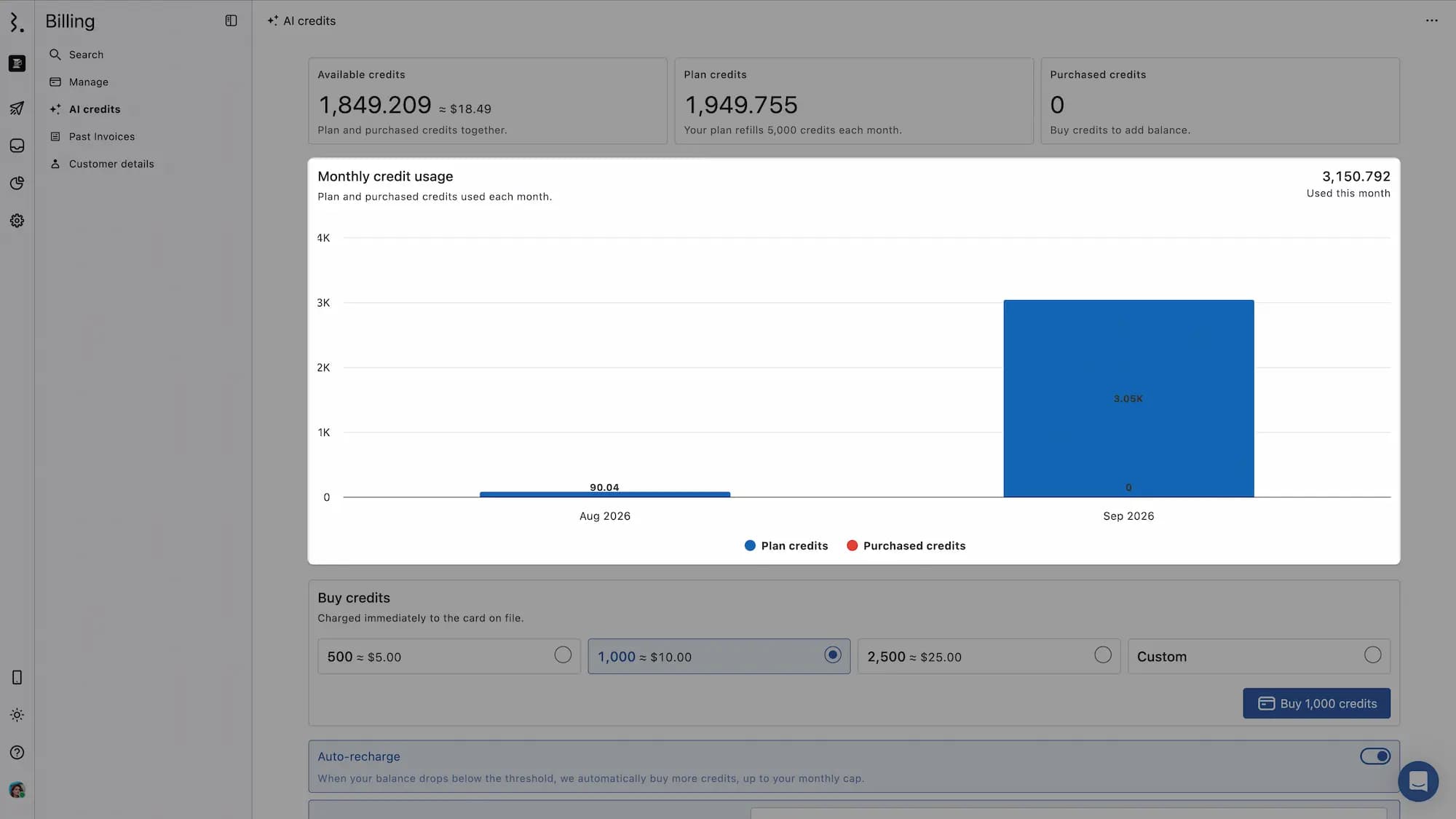
The Monthly credit usage chart shows how many credits you have used each month, split into plan credits and purchased credits. Your total for the current month sits above the chart on the right.
Use it to see whether your plan allowance covers your team comfortably. If you are buying credits every month, a higher plan may work out better.
How To Buy More AI Credits
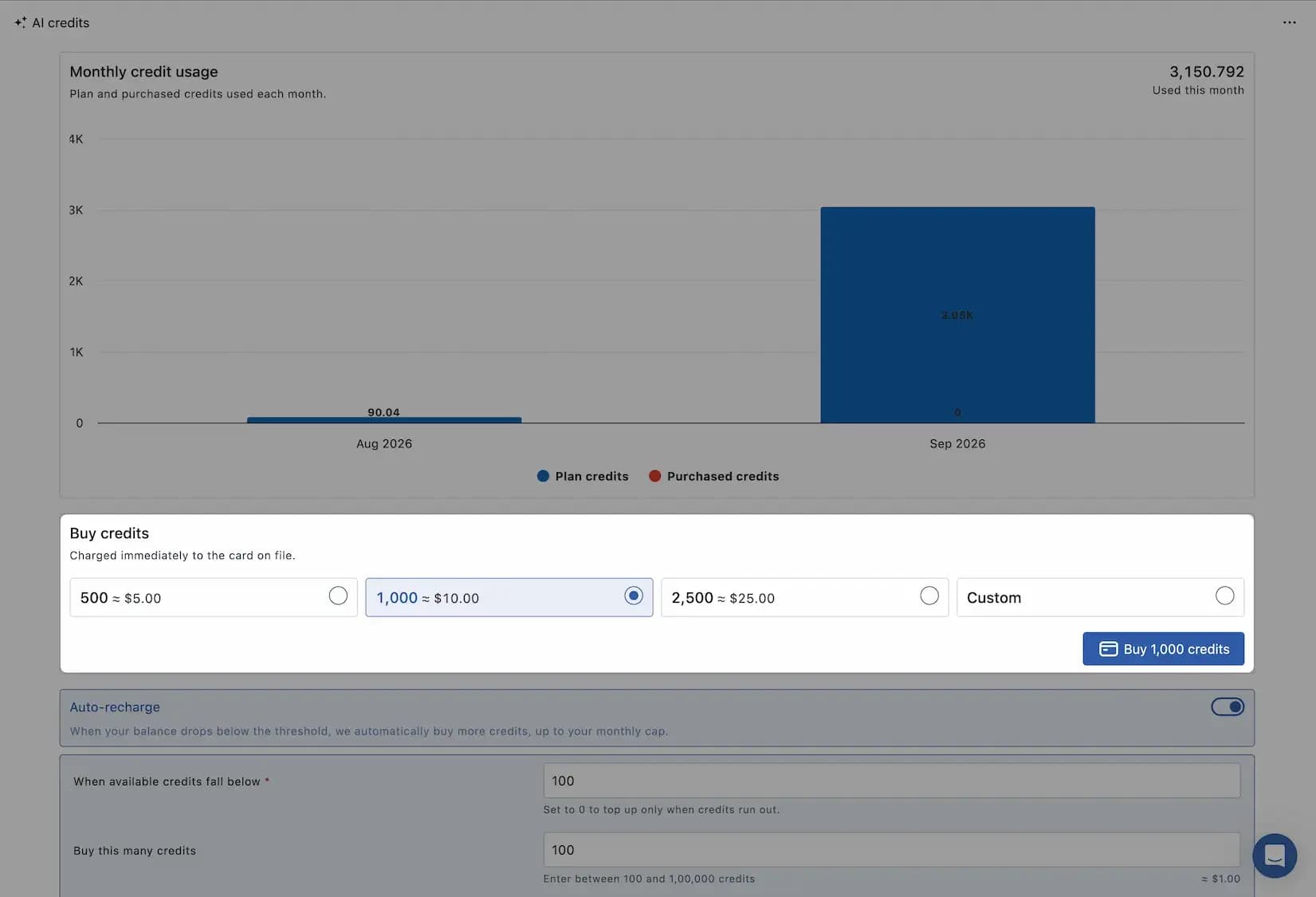
Primary Owners and Owners can buy credits at any time, whether or not your plan credits have run out.
From the Statusbrew dashboard, go to Billing.
Select AI credits from the left sidebar.
Scroll to Buy credits.
Choose 500, 1,000, or 2,500 credits, or select Custom and enter any amount between 100 and 100,000 credits.
Click the buy button, which shows the amount you selected.
Purchased credits are added to your balance straight away.
Credits are charged immediately to the card on file. Nothing is added to your next invoice.
Set Up Auto-Recharge
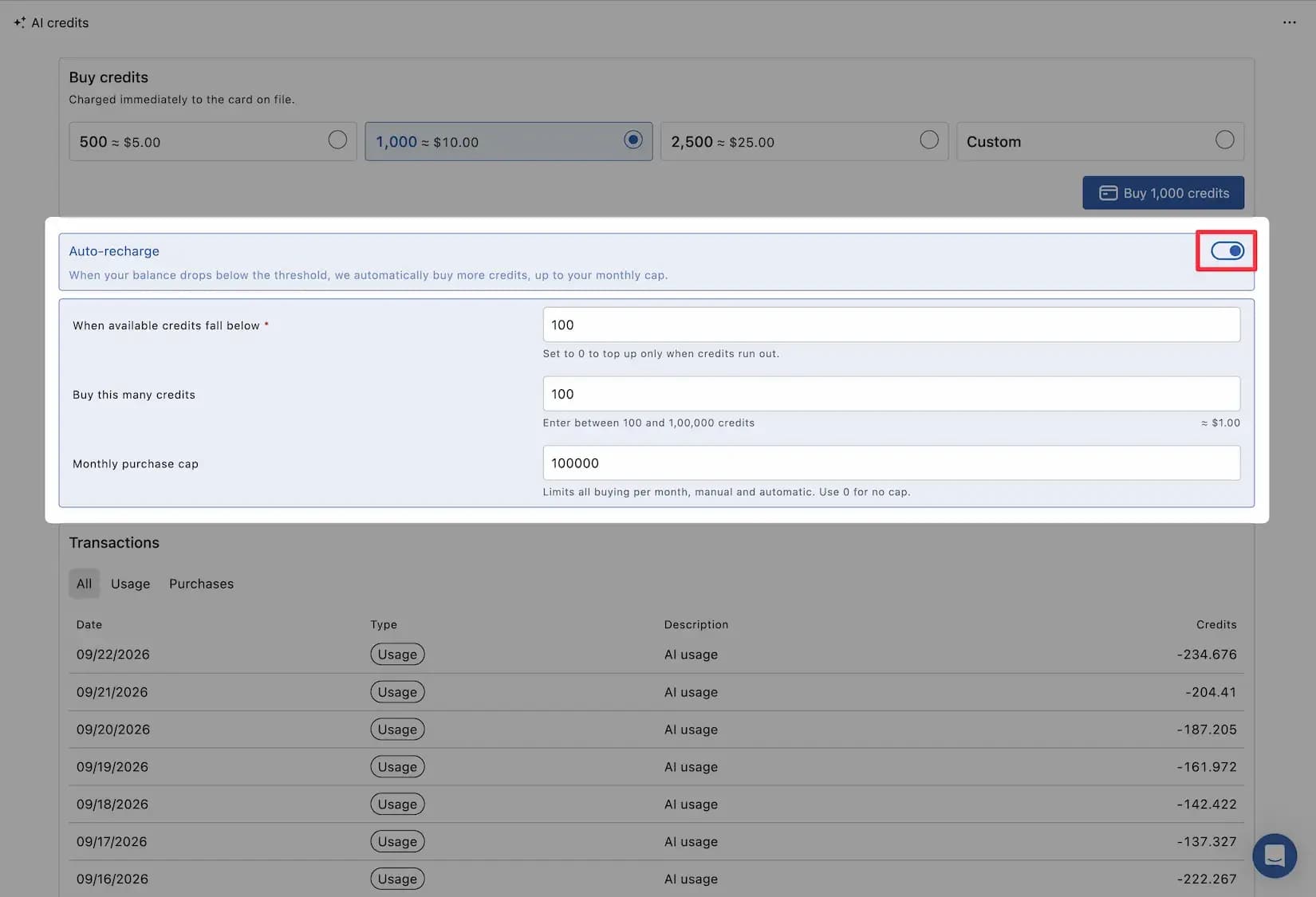
Auto-recharge buys credits for you when your balance gets low, so AI features keep running without anyone watching the number.
Under Auto-recharge on the same page, set three values:
When available credits fall below is the threshold that triggers a top-up. Set it to 0 to top up only once credits have run out.
Buy this many credits is how much to buy each time, between 100 and 100,000 credits.
Monthly purchase cap limits how much can be bought in a month, up to 10,000,000 credits. Set it to 0 for no cap.
The monthly purchase cap limits all buying in a month, manual and automatic together. Once you hit it, you cannot buy more credits that month until you raise it, even by hand.
Review Your Credit Transactions
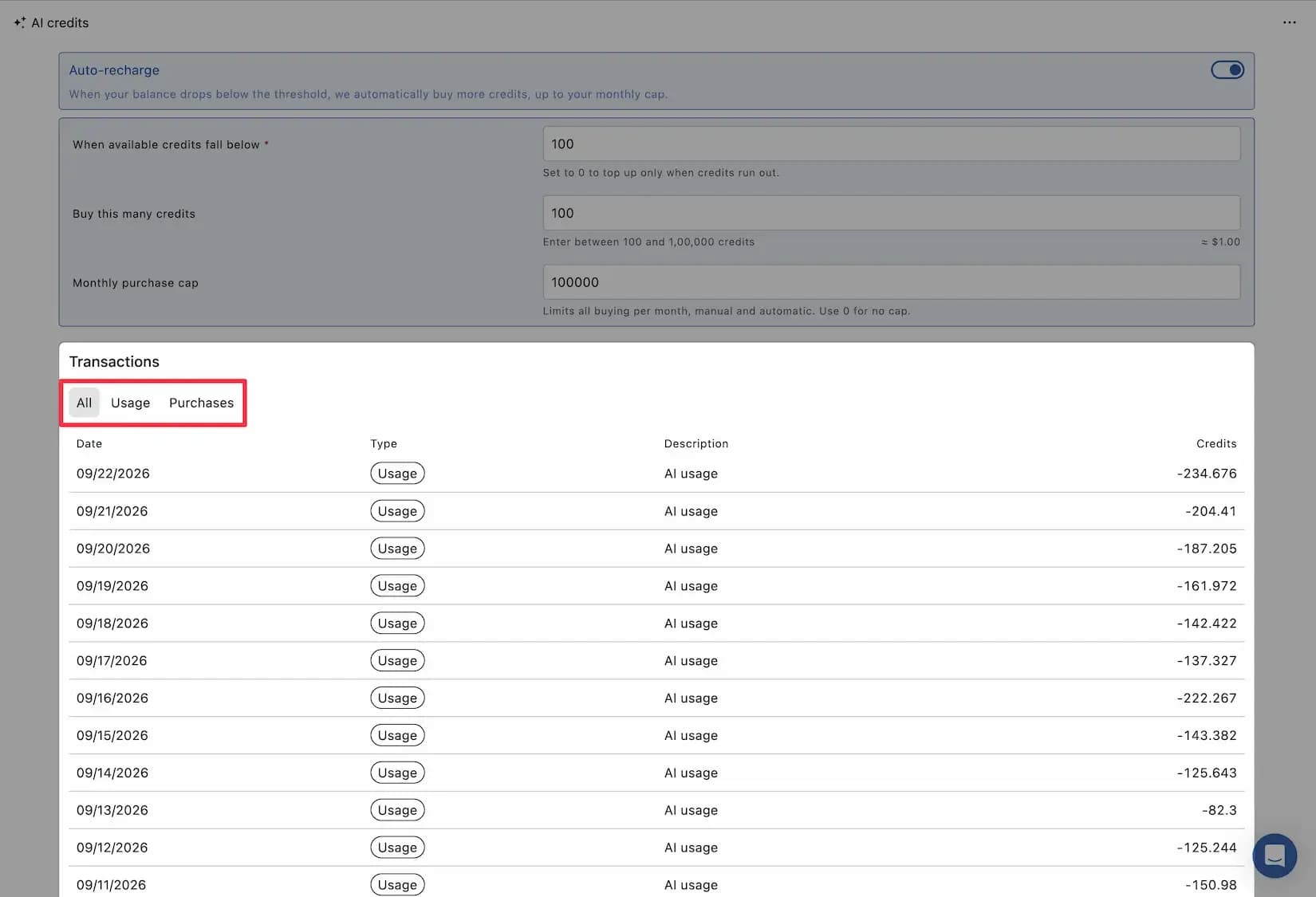
The Transactions table at the bottom of the page lists every change to your balance, with the date, type, description, and number of credits. Filter it with the All, Usage, and Purchases tabs.
Three types appear:
Usage is credits spent by AI features.
Purchase is credits you bought, labeled either Manual purchase or Auto-recharge.
Adjustment is a correction made to your balance, such as a support credit or a refunded duplicate charge.
What Happens When I Run Out Of AI Credits?
AI features pause when your balance reaches zero. This applies to every AI feature, including the ones that run automatically, so an active Let AI reply rule stops replying until your balance is topped up.
Statusbrew shows a banner at the top of the AI credits page in three situations:
Low balance: Credits are running low. Auto-recharge will top up your balance shortly, or you can buy more now.
AI features are paused: You are out of credits, and AI features have paused. Auto-recharge could not cover this, so buy credits to resume them.
Monthly purchase cap reached: You have reached your monthly purchase cap, so no more credits can be bought this month. Raise the cap to continue.
These banners appear only on the AI credits page. There is no warning anywhere else in Statusbrew and no email or notification when your credits run low, so nothing will tell you before AI features pause.
Set up auto-recharge, or check Billing > AI credits regularly, especially if you rely on automatic AI features.
Your plan credits refill when your subscription renews. To get AI working again before then, buy credits or let auto-recharge do it.
FAQs
Why Are My AI Features Not Working?
An empty credit balance is the most likely reason. AI features pause the moment credits run out, and nothing outside the AI credits page will tell you it has happened.
Go to Billing > AI credits and check Available credits. A banner at the top of the page tells you which situation you are in:
Low balance means AI is still working but will not be for long. Buy credits, or let auto-recharge top you up.
AI features are paused means you are out of credits. Buy credits to start them again.
Monthly purchase cap reached means no more credits can be bought this month until someone raises the cap.
If the page shows Add a payment method rather than your balances, the account is on a trial. Credits are still being used, but there is no way to see how many are left until you subscribe to a paid plan.
If you cannot see Billing in your sidebar, you do not have access to it. Ask your Primary Owner or an Owner to check the balance and buy credits for you.
Do I Get AI Credits During My Trial?
Yes. You get the monthly allowance of the plan you are trialling, and AI features work the same as they do on a paid subscription.
What you do not get is the dashboard. The AI credits page stays hidden for the whole trial and shows Add a payment method instead, so there is no way to see your balance, your usage, or your transactions while you are trialling. Subscribe to a paid plan and the full page appears.
Why Does The AI Credits Page Say "Add A Payment Method"?
The account is not on a paid plan yet. Buying credits and auto-recharge both need a card on file, so until you subscribe the page shows this message in place of your balances, usage chart, and everything else.
This does not stop AI features from working or pause your credits. They carry on in the background; you just cannot see them.
Click Go to billing to subscribe. You choose a plan, add your card, and complete the purchase, the same steps covered in Change Your Plan. On a trial, you will not be charged until your trial ends.
If you cannot access billing yourself, ask your Primary Owner or another Owner to do it.
Will Statusbrew Warn Me Before I Run Out Of AI Credits?
Only on the AI credits page itself, where a Low balance banner appears once your balance gets low. There is no global warning, email, or any other notification in Statusbrew. The reliable way to avoid a pause is to turn on auto-recharge.
How Many Credits Does One AI Action Use?
Most actions cost between 2 and 5 credits. There is no fixed price per action, because the cost depends on how much work the request involves.
Take an AI reply in Engage. What it costs depends on how long and how complex your instructions are, how much of the conversation the AI reads before writing, and how long the reply it produces is. A short instruction that returns a one-line reply sits at the bottom of the range. A detailed instruction with several rules to follow, returning a longer reply, sits at the top.
The same pattern holds everywhere. Rephrasing a short comment costs less than generating five caption options from a long article.
For what your own actions actually cost, check the Transactions table, which lists every deduction, and the Monthly credit usage chart for the trend.
Do My Unused AI Credits Roll Over To Next Month?
Plan credits do not. Your allowance resets each month when your subscription renews. Purchased credits do roll over and stay on your account until you use them.
How Do I Stop Auto-Recharge From Buying Credits?
Set your Monthly purchase cap to the maximum you are willing to spend in a month, or clear the auto-recharge threshold so no top-up is triggered. The cap covers manual and automatic purchases together.
Why Can I Not Buy More AI Credits?
You have most likely reached your Monthly purchase cap, which blocks all buying for the rest of the month. Raise the cap under Auto-recharge to continue, or set it to 0 for no cap.
How Many AI Credits Can I Buy At Once?
Between 100 and 100,000 credits in a single purchase, whether you buy by hand or through auto-recharge. There is no limit on how many purchases you make in a month unless you set a Monthly purchase cap, which can go as high as 10,000,000 credits.
Who Can Buy AI Credits?
Primary Owners and Owners, from Billing > AI credits under Buy credits. The amount is charged to the card on file.
What Is A Credit Adjustment In My Transactions?
An adjustment is a correction to your balance rather than usage or a purchase, such as credits added by support or removed after a duplicate charge. The description explains the reason.
Why Is My Credit Balance A Decimal?
Credits are deducted in fractions based on the size of each request, so balances are rarely whole numbers.
Can I Stop AI Features From Using My Credits?
Start with anything that runs on its own, since that spends credits whether or not you are working. Check your Engage rules for Let AI reply and Describe intent, and your approval workflows for AI Review Instructions, then switch off what you do not need. Anything you trigger by hand only costs credits when you use it.
Do AI Credits Cost Extra On Top Of My Subscription?
The credits included with your plan are part of your subscription. Any credits you buy, manually or through auto-recharge, are charged separately to the card on file.