Why Does My Top Posts Widget Show a "Not Compatible" Error?
If your Top Posts widget shows a "This dimension is not compatible" error, you're likely mixing Post metrics with page-level metrics. These two categories can't be combined in the same widget.
Who can do this?
Anyone with access to Reports. Available on Standard, Premium, and Enterprise plans.
Post metrics vs. page metrics
Statusbrew separates metrics into categories based on what they measure.
Page metrics (Engagement, Impressions, Reach, Engagement Rate) measure your overall account performance, total numbers across your entire profile. These are profile-level figures.
Post metrics measure how individual posts perform. They live under the Post category in the metric picker, and their names start with "Post": Post Engagement, Post Impressions, Post Reach, Post Engagement Rate, and so on.
When building a Top Posts widget, you need Post metrics. Selecting page-level metrics, such as Engagement Rate, from the Engagement category results in the "This dimension is not compatible" error because those metrics can't be mapped to individual posts.
Post metrics and page-level metrics cannot be combined in the same widget. Always select from the Post category when building post-level widgets.
How to build a Top Posts widget correctly?
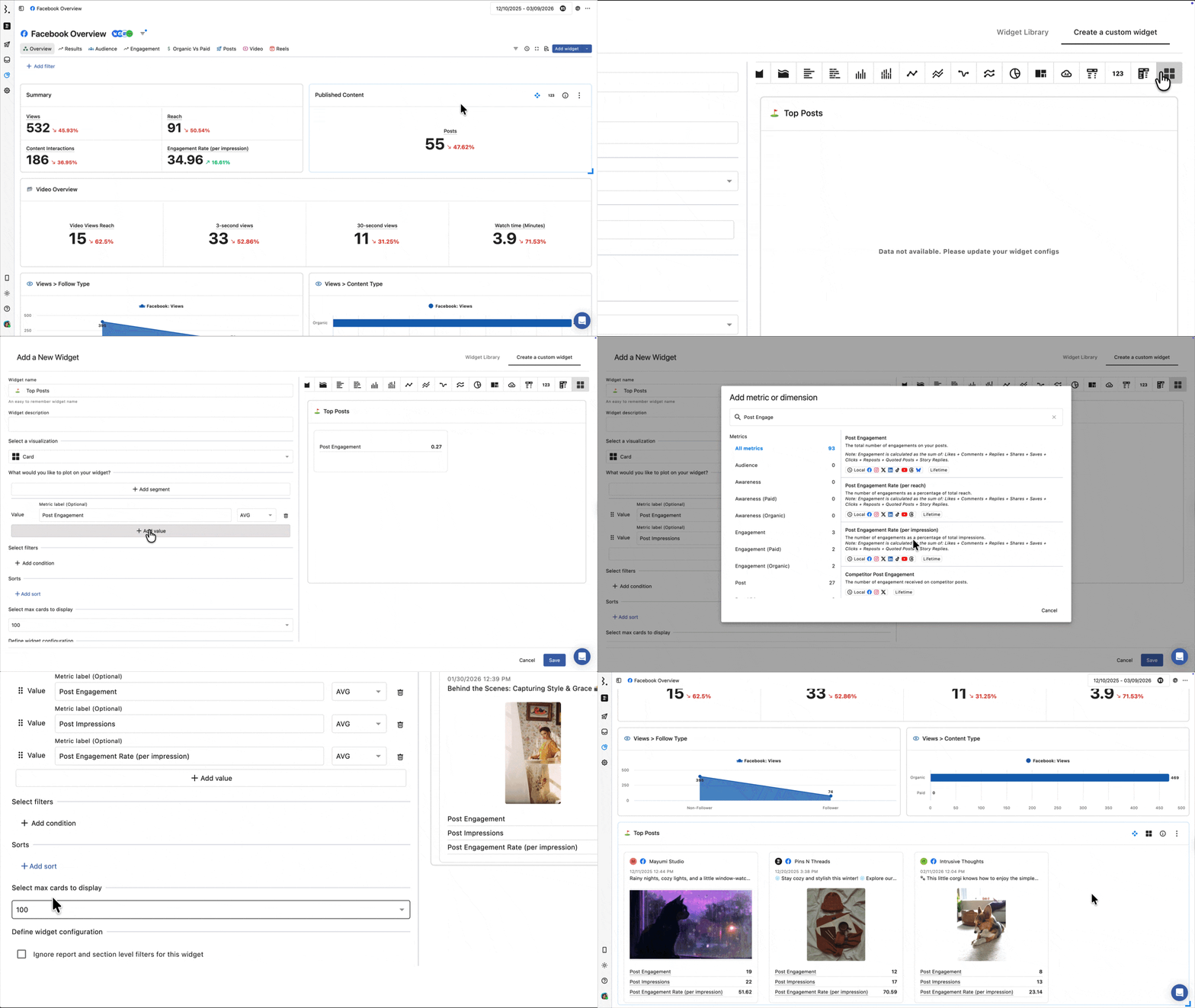
Go to Reports and open your report.
Click Add widget, then Create a custom widget.
Select Card as your visualization.
In the metric picker, look for the Post category and select your metric:
Post Engagement: Ranks posts by total engagements
Post Impressions: Ranks posts by total impressions
Post Engagement Rate (per reach)
or
Post Engagement Rate (per impression): Ranks posts by engagement rate
Manually add Post as your dimension/segment.
Under Sorting, select your Post metric and set the order to Descending to surface your best-performing posts first.
Set Select max cards to display to the number of top posts you want to show.
Click Save.
All Post metrics start with the word "Post." When in doubt, check the metric name, if it doesn't start with "Post," it's a page-level metric and won't work in a post-level widget.
How to fix an existing widget showing the error?
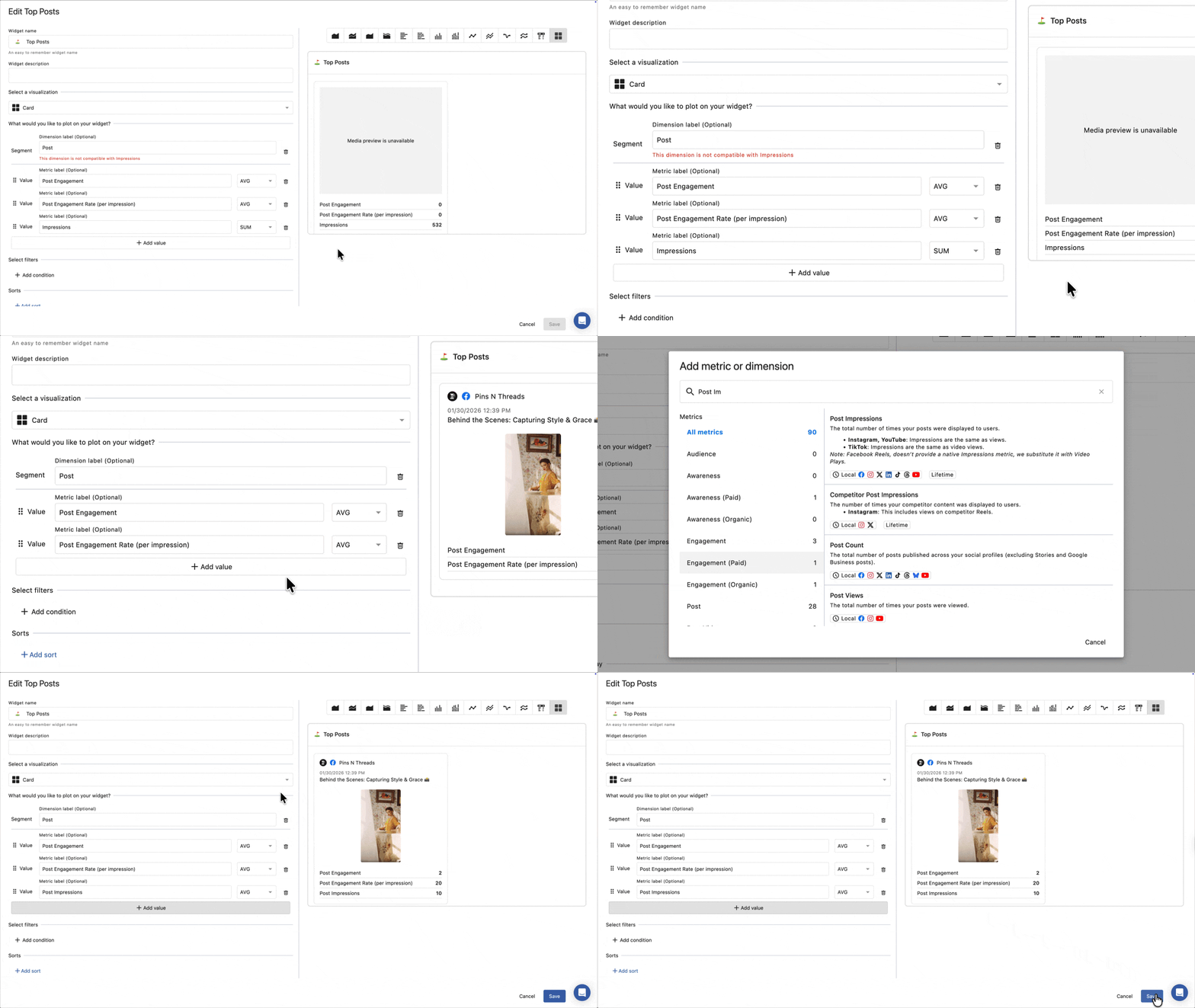
Click on the widget and select Edit.
Check which metrics are selected. Remove any that don't start with "Post"; these are causing the conflict.
The error will clear immediately in the live preview once the incompatible metric is removed.
Click Save.
FAQs
What does "This dimension is not compatible" mean?
It means that one or more metrics in your widget can't be used with the dimension or other metrics you've selected. In a Top Posts widget, this almost always means a page-level metric (like Engagement or Engagement Rate) has been added alongside a Post metric. Remove the page-level metric, and the error will clear.
What metrics should I use to show top posts by engagement?
Use Post Engagement from the Post category. This counts total engagements (likes, comments, shares, saves, replies, clicks, reposts) per individual post. Sort descending to show your most-engaged posts first.
Don't use the page-level Engagement metric that measures your account's overall total, not individual post performance.
What metrics should I use to show top posts by engagement rate?
Use Post Engagement Rate (per reach) or Post Engagement Rate (per impression); both are in the Post category and work cleanly in a Card widget.
Per reach: engagements as a percentage of unique viewers
Per impression: engagements as a percentage of total views, including repeat views
Can I combine multiple Post metrics into a single widget?
Yes. All Post metrics are compatible with each other. You can add Post Engagement, Post Impressions, and Post Reach to the same widget without any errors. Just make sure every metric you select is from the Post category.
Does removing the wrong metric fix the error immediately?
Yes. The error clears immediately in the live preview when you remove the incompatible metric. You don't need to save and reopen the editor.
Can I filter the Top Posts widget by network?
Yes. Add a network filter inside the widget editor. Network filters are compatible with Post metrics, so you can narrow the widget to show top posts from a specific platform.
Can I download a Top Posts widget as a PDF?
Not directly.
Individual widgets don't have a PDF export option. Here's what you can do instead:
Export as CSV: Click (More) on the widget and select Export as CSV. Opens in Excel or Google Sheets.
Download widget image: Downloads a PNG of the widget, useful for presentations and documents.
Download full report as PDF: Click Download PDF from the toolbar at the top of the report. Choose Stack View or Grid View:
Stack View: One widget per page. Recommended for printing or sharing.
Grid View: Widgets in a 4x3 grid layout. (Experimental — page breaks may not work correctly.)
PDF generation time depends on the selected date range. The longer the reporting period, the more data the file contains and the longer the download takes.
Why does my widget show "Data not available. Please update your widget configs"?
This error appears due to the following reasons:
The Statusbrew team hasn't initiated data sync for your account yet. Reach out for support to get this triggered
The metric and dimension you've selected are incompatible (e.g., post vs page metrics)
You just added a competitor channel competitor data takes up to 24 hours to sync after being added
The profile the widget depends on has been removed from the report or disconnected from Statusbrew
The widget uses a network-specific metric (e.g., Content Interactions for Instagram), but no matching profile is selected as a data source
The report was duplicated, and data sources didn't carry over; re-add them from the data source selector.