What Is Statusbrew and Who Is It For?
Statusbrew is a social media management platform for agencies and teams managing multiple clients, brands, locations, or social accounts. It brings publishing, engagement, reporting, listening, approvals, and automation into one organized workspace.
What Is Statusbrew?
Statusbrew is a social media management platform for teams and agencies that run social at scale. You can plan and schedule content, manage comments, DMs, reviews, and mentions from a single inbox, and report across your clients and connected social and reputation channels.
If you juggle dozens of profiles across multiple brands or clients, Statusbrew keeps each account organized, each client's work separate, and your whole team working from one dashboard.
The idea is simple: take the busywork and account-switching off your plate so your team can focus on the work that grows every brand you manage.
Who Is Statusbrew For?
Statusbrew is built for anyone managing more than a handful of social accounts:
Agencies running social for many clients, each with their own profiles, approvals, and reports
Multi-brand and franchise teams coordinating across brands, regions, and locations
In-house teams managing several profiles across networks with multiple people involved
If you manage multiple accounts and more than one person touches them, Statusbrew is designed for you.
Spaces keep each client or brand in its own workspace, and roles, permissions, and approval workflows keep everyone aligned without stepping on each other.
How Does Statusbrew Compare to Other Platforms?
Statusbrew provides the publishing, engagement, reporting, automation, and collaboration depth teams expect from leading social media management platforms, at pricing designed to scale more sensibly.
You get advanced tools for managing content, conversations, analytics, clients, and team access without the enterprise price tag or long-term lock-in.
Switching from another platform? Statusbrew can help migrate available post, conversation, and reporting data. Historical reporting backfill depends on each network's API and may require assistance from our team. Onboarding and training help are available for your team.
How Does Statusbrew Organize Your Accounts and Team?
Managing many accounts is the core of what Statusbrew does. A few building blocks keep everything in order.
Organization and Spaces: Your organization sits at the top. Inside it, each Space is an isolated workspace for a client or brand, with its own profiles, team members, tags, and reports. Nothing bleeds between clients.
Profile groups: Group profiles by client, brand, or region so you can publish, moderate, and report across a whole group at once instead of one profile at a time.
Users and user groups: Invite your team, then bundle people into user groups like "Client A team" or "Interns" to assign conversations, route approvals, and send notifications to the whole group at once.
Roles and permissions: Control exactly what each person sees and can do within each Space, so someone assigned to one client can't access another's accounts.
Tags and custom fields: Label posts and conversations consistently to organize and report across every client.
What Can You Do in Statusbrew?
Publish
Plan posts in the Global Composer and tailor them per network with live previews, so every client's content looks right before it goes live.
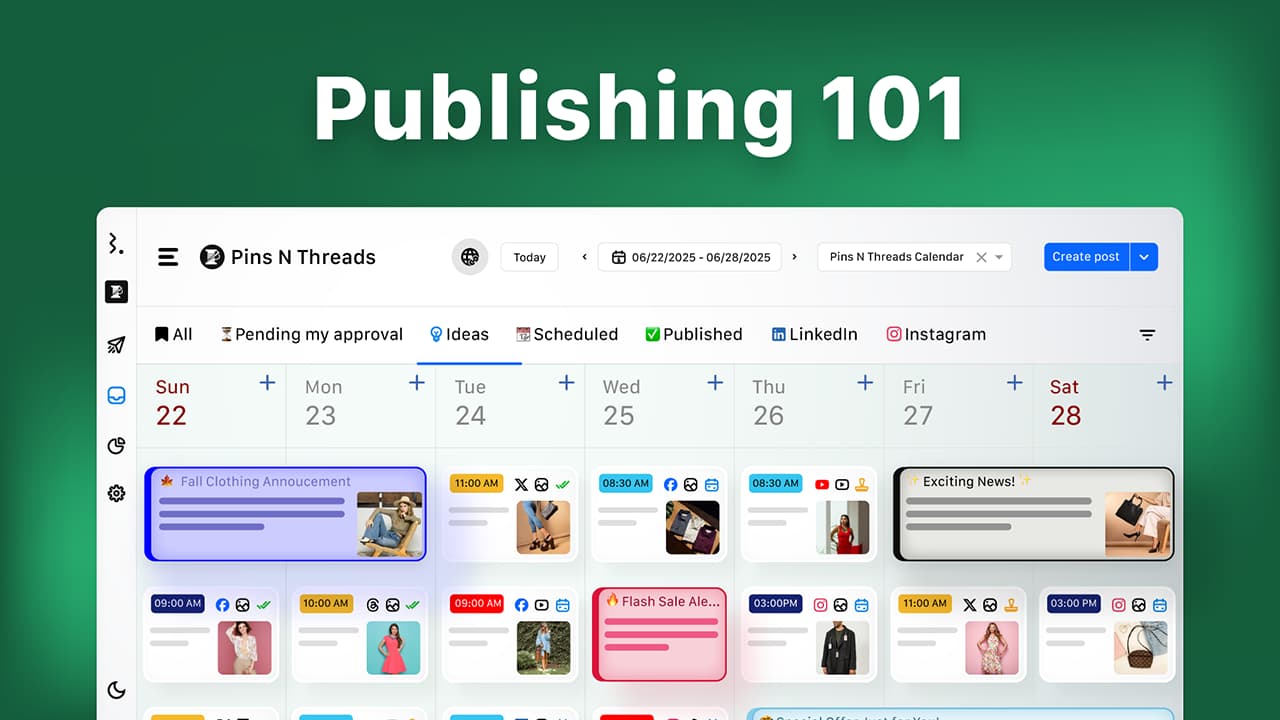
Schedule across many profiles at once: set custom times or use algorithm-driven optimal times. Edit scheduled posts anytime, including alt text and thumbnails.
Use network-specific publishing options such as trending audio, first comments, Instagram collaborators, product tags, Reels, Stories, carousels, Threads, and polls, where supported.
Some options depend on the network, content type, profile connection method, or mobile publishing.
Learn how Statusbrew's Composer makes publishing across accounts seamless.
Projects
Projects let you build filtered views of your content calendar per client or campaign, structured with custom sections, so planning matches how your agency works.
A board is personal to you, and you can add teammates as collaborators or share it externally with clients who don't have a Statusbrew account.
Projects can also include dedicated Approvals and Report sections, bringing content planning, pending reviews, and campaign reporting into the same client-facing board.
You can create custom reports using the available 270+ metrics, and shared links can include these reporting sections based on the visibility settings you choose.
Client Collaboration, Approvals, and Sharing
Get client sign-off without the email back-and-forth. Configurable approval workflows route posts to the right reviewers before anything publishes. Drop notes, tag teammates, and comment right next to each post.

Bring clients in without paying for extra seats, with no limit on how many you invite. Guest users can view, comment, and suggest edits on shared calendars and projects, and external approvers can sign off on posts, all without a full Statusbrew account.
Share your work with a link. Send a client a board or calendar to review scheduled content, or let them connect their own social profile via a shared link without handing over account access.
Assignment and approval workflows are available on the Premium plan and above.
Engage Inbox
The Engage Inbox brings every organic and paid conversation, comments, DMs, reviews, and mentions across all your clients' accounts into one place.
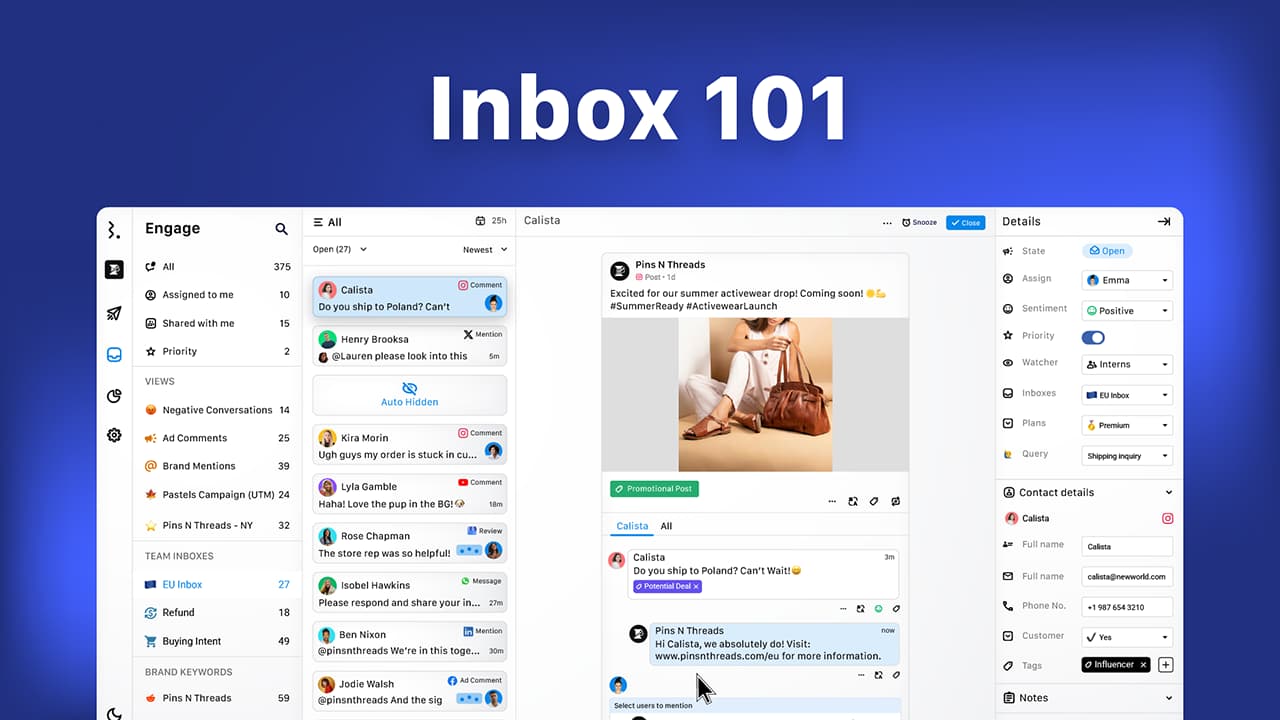
Route conversations into team inboxes so each client or team sees only its own queue. Assign conversations, filter and act in bulk, and answer common questions consistently with macros (saved replies).
Statusbrew includes a built-in social CRM that keeps each contact's full history and tags in one place. You can also sync to HubSpot and Salesforce (available on Enterprise) to push conversations and contacts into your existing CRM.
Auto-hide or delete organic and ad comments, auto-reply to Facebook and Instagram comments with a private DM, and build custom moderation rules per client based on network, keywords, sentiment, and more. Manage reviews from Google Business Profile, the App Store, and Play Store in the same inbox, including automatic public replies to Google reviews.
Listening
Track what people say about each client beyond their own profiles. Listening monitors brand and competitor keywords across X, Instagram, Threads, YouTube, Reddit, and the web, including blogs and news sources.
Use it to spot mentions, trends, and conversations worth joining.
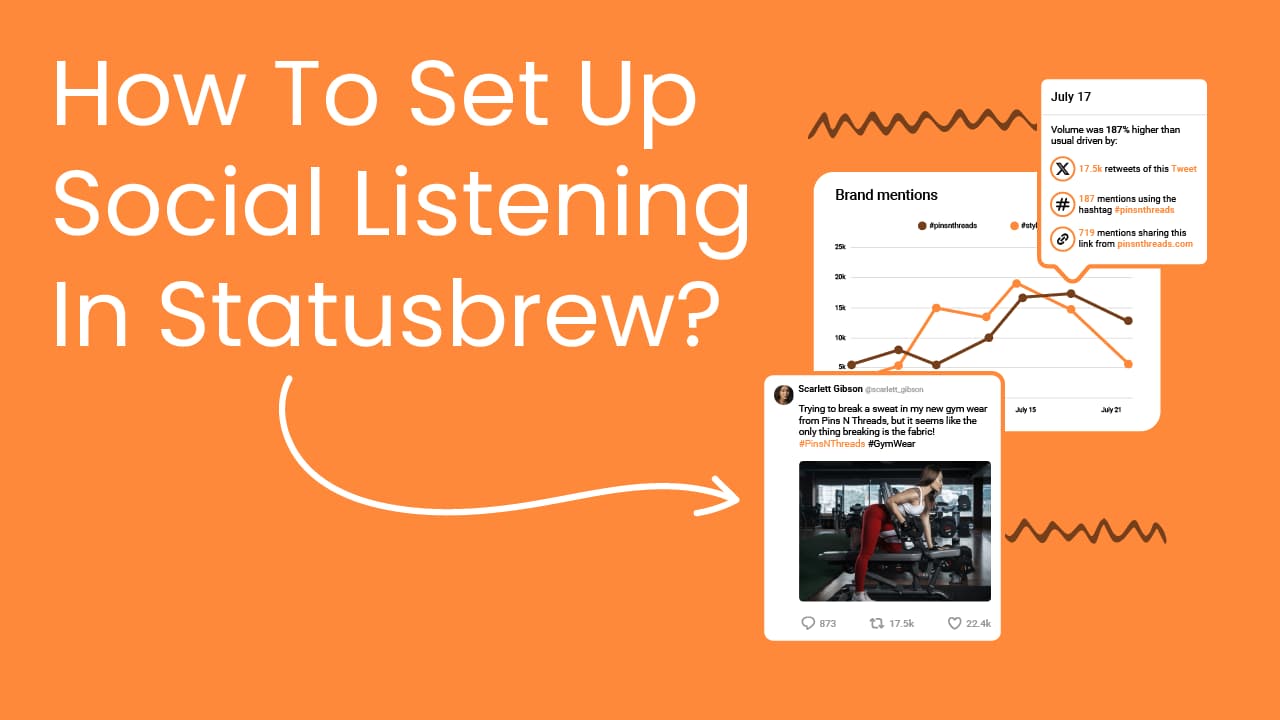
Available on Premium and above.
Reports
Report at every level: a single post, one client, or your whole book of business.
Statusbrew offers 270+ metrics across supported social and reputation channels, with combined and per-profile reports and fully customizable dashboards.
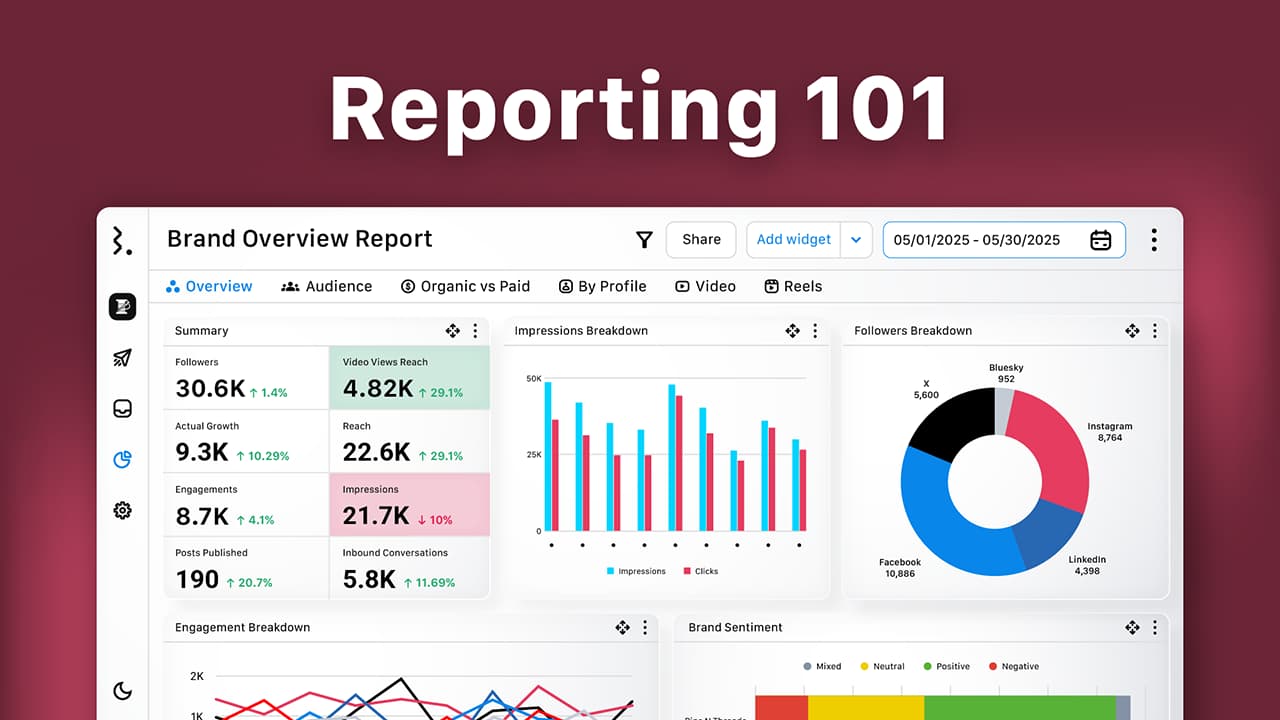
Start from a pre-built template or build your own with the Widget Builder, or just describe the widget you want in plain language and let AI build it. Compare organic vs. paid, benchmark clients against competitors, and analyze team and SLA performance. Reports auto-export and share with each client on the schedule you choose.
Get network-dependent historical data backfill up to 18 months on supported networks, along with ongoing data retention after profiles are connected.
Available on Standard and above.
Integrations
Connect every client's profiles, your storage, analytics, and business tools in one place.
Social and reputation platforms we support:
Facebook
Instagram
Instagram Threads
X (formerly Twitter)
LinkedIn (profiles and company pages)
YouTube
TikTok
Pinterest
Reddit
Bluesky
Google Business Profile
WhatsApp Business
Line
Trustpilot
Play Store
App Store
Third-party tools:
Communication: Slack, MS Teams
Design and storage: Canva, Google Drive, Dropbox
Analytics: Google Analytics 4
CRM: HubSpot, Salesforce
Link shortening: Statusbrew's own built-in URL shortener, called sbrew.link, plus Bitly for branded links
Available publishing, engagement, listening, and reporting capabilities vary by network, account type, plan, and the permissions provided by each social network's API.
How Do You Automate Work Across Accounts?
When you manage many accounts, automation is what keeps the workload sane. Statusbrew has two rule builders that do the repetitive work for you.
Publish Rules govern publishing across profiles or profile groups.
Set conditions on post events to auto-send posts for approval, auto-tag for consistent client reporting, add watchers, reject off-brand or non-compliant content, and fire Slack, Microsoft Teams, email, or in-app alerts.
Available on Premium and Enterprise.
Engage Rules (Rule Engine) govern the inbox across accounts. For every incoming message, they can auto-hide, unhide, or delete comments; auto-reply to Facebook and Instagram comments with a private DM; post a public reply to Google reviews; assign and route conversations; close resolved threads; mark as priority; and tag by keyword or sentiment.
Ready-made templates get you moderating in minutes. Engage Rules are available on Standard and above; AI features, such as the AI Keyword Assistant, are available on Premium and above.
Set a rule once on a profile group and it runs across every account in that group, so onboarding a new client's profiles doesn't mean rebuilding your automations.
Can You Run Statusbrew With AI?
Yes. AI runs through Statusbrew across publishing, engagement, and reporting.
Brew AI in Compose: Statusbrew's content assistant (Brew AI) refines captions in your brand voice. Rewrite or rephrase existing copy, generate from a topic or a linked article, spin up new posts from your top-performing content, and translate captions into 15 languages, adding emojis and hashtags on request.
AI Assistant in Engage: Draft your reply, then use AI Assistant to rephrase, shorten, expand, adjust the tone, fix grammar, or translate it into one of 15 supported languages.
For hands-off responses, Engage Rules can auto-reply to Facebook and Instagram comments with a private DM and post public replies to Google reviews. Sentiment analysis and the AI Keyword Assistant in rules round out Engage's AI.
AI report builder: Describe the widget you want in plain language, and AI configures the metric, dimension, filters, and chart for you. Every field stays editable, so you build the exact custom report you want without knowing metric names.
Statusbrew MCP: Connect Statusbrew to Claude, ChatGPT, Gemini, Copilot, or any MCP-compatible AI tool. Once connected, you can ask your AI to create posts, schedule campaigns, apply tags, check approvals, and pull reports across your accounts, just by asking.

AI features are available on the Premium plan and above. MCP comes with Enterprise (just request to enable it) and is available as an add-on on the Premium plan.
What Plans Does Statusbrew Offer?
Statusbrew has four plans, plus a custom plan for agencies and teams managing multiple accounts. Each plan builds on the one before it.
Lite ($69/month, billed annually): 1 user, 5 social profiles. Essentials for one person: publishing, the all-in-one inbox, and basic comment moderation.
Standard ($129/month, billed annually): 3 users, 10 social profiles. Adds reporting with network-dependent historical data backfill, BrewLink-in-bio, Google Business Profile, and Rule Engine for automated moderation.
Premium ($229/month, billed annually): 6 users, 15 social profiles (add more anytime). Adds AI sentiment analysis, assignment and approval workflows, team and SLA reporting, competitor benchmarking, and social and web listening.
Enterprise (custom pricing): unlimited users and social profiles. Adds a dedicated account manager, HubSpot and Salesforce, SAML single sign-on, the Statusbrew MCP, and compliance support.
Agencies and multiple account management (custom plan): Unlimited Spaces, shareable calendars and reports, and collaboration features for managing multiple clients, brands, or locations.
Need more seats or profiles? You can add them to your plan without jumping to a higher tier.
Is Your Data Secure?
Handling many clients' accounts means security matters. Statusbrew is SOC 2 Type II and GDPR compliant, with data encrypted at rest on AWS.
SSO/SAML and two-factor authentication to secure sign-in
Roles and permissions so people only access the clients and actions they should
Team Activity Logs for a full audit trail across your organization. Included with Enterprise and available as an add-on for Premium
What Won't Statusbrew Do?
Part of what makes Statusbrew different is what it won't do:
No unexpected price hikes. Your plan pricing is designed to remain predictable as your team grows.
No long contracts. Come and go as you please.
No upselling or sales spam. You hear from us only when it matters.
No complex pricing. We recommend the best plan for you, even if it's a cheaper one.
No waiting. Our Customer Success team works across multiple time zones and responds fast.
Is Statusbrew Right for You?
Statusbrew is a strong fit if you want to:
Manage many clients or brands from one dashboard, each in its own Space
Publish and moderate across whole groups of profiles at once
Handle every comment, DM, review, and mention across all clients in one inbox
Get client approvals and share calendars and reports without extra seats
Report per client and across your whole book of business with 270+ metrics
Keep teams aligned with roles, permissions, and approval workflows
Automate publishing and moderation across accounts with rules
If any of these sound like you, Statusbrew is built for the way your team works.
How Do You Get Started?
Go to statusbrew.com and click Free Trial.
Fill in your details and click Agree and Sign up.
Set up your organization, add your clients' profiles, and start exploring.
Your trial is free for 14 days, no credit card required.
How Do You Get Support?
Live chat: The fastest option, backed by AI and human agents, is the live chat. To reach a human, type "human please" or "talk to agent" in the chat.
Ticket support: Send your query via the Contact Support form.
Email: Customer Success or Sales at sales@statusbrew.com.
FAQs
Is Statusbrew Good for Agencies?
Yes. Statusbrew is built for agencies managing many clients. Spaces keep each client isolated, profile groups let you act across accounts at once, and shareable calendars, approvals, and reports keep clients in the loop, all under agency pricing that scales per client.
How Do I Keep Each Client's Accounts Separate?
Use Spaces. Each Space is its own workspace with its own profiles, team members, tags, and reports, so no client's data mixes with another's. Roles and permissions control which team members can access each Space.
What Is a User Group, and Why Would I Use One?
A user group bundles team members together, for example, a "Client A team" or "Interns" group. Instead of assigning conversations, routing approvals, or sending notifications to people one by one, you do it for the whole group at once. It keeps large teams organized as you add clients.
Can I Organize My Team's Inbox by Client?
Yes. Team inboxes route each client's conversations into a separate queue, so agents see only what's theirs. Combine them with macros (saved replies) to answer common questions consistently across clients.
Can Clients Review and Approve Posts Without a Paid Seat?
Yes, with no limit on the number of guests. Guest users can view, comment, and suggest edits on shared calendars and projects, and external approvers can sign off on posts, all without a full Statusbrew account.
Can I Publish or Moderate Across Many Accounts at Once?
Yes. Group profiles by client, brand, or region, then publish to the whole group or apply Publish Rules and Engage Rules across every account in that group at once.
How Is Statusbrew Priced for Agencies and Multiple Account Management?
Statusbrew offers a custom plan for agencies and teams managing multiple accounts. It includes unlimited Spaces, shareable calendars and reports, and collaboration features designed for managing multiple clients, brands, or locations. Chat now to get your custom pricing.
How Many Social Channels Can I Connect?
Statusbrew supports 15+ social and reputation platforms, including Facebook, Instagram, Instagram Threads, X, LinkedIn, YouTube, TikTok, Pinterest, Reddit, Bluesky, Google Business Profile, WhatsApp Business, Line, Trustpilot, Play Store, and App Store. Available capabilities vary by network, account type, plan, and API permissions.
Can I Automate Posting and Moderation?
Yes. Engage Rules automate your inbox (hiding, deleting, assigning, and tagging conversations, auto-replying to Facebook and Instagram comments with a private DM, and posting public replies to Google reviews) on Standard and above. Publish Rules automate your publishing workflow (approvals, tagging, alerts, and compliance checks) on Premium and above. AI features, such as the AI Keyword Assistant and AI Reply, are available on Premium and above.
Does Statusbrew Have Built-In AI?
Yes. Brew AI writes and translates captions in Compose, the AI Assistant rephrases and translates replies in Engage, and the AI report builder turns a plain-language description into a report widget. These AI features are available on Premium and above.
Can I Use Statusbrew With ChatGPT or Claude?
Yes. The Statusbrew MCP connects your account to Claude, ChatGPT, Gemini, or Copilot, so you can publish, tag, check approvals, and pull reports by asking your AI. MCP comes with Enterprise (just request to enable it) and is available as an add-on on the Premium plan.
Can I Move My Clients' Data From Another Tool to Statusbrew?
Statusbrew can help migrate available posts, conversations, and reporting data when you switch. Historical reporting backfill depends on each network's API and can reach up to 18 months on supported networks. Some migrations may require assistance from our team, and onboarding and training help are available along the way.