Duplicate a report
Statusbrew Reports allows you to clone reports. If you need to create a similar report, you can clone an existing report and edit it as needed, saving you a lot of time. Cloned reports can also be reused in other spaces within Statusbrew.
From Statusbrew Home, click Reports .
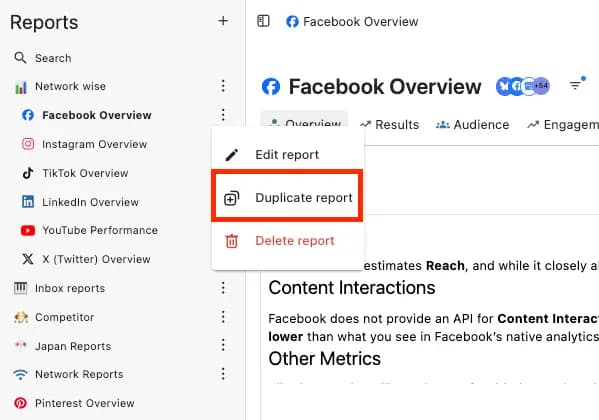
From the left panel, select any report.
Click on & click Duplicate report
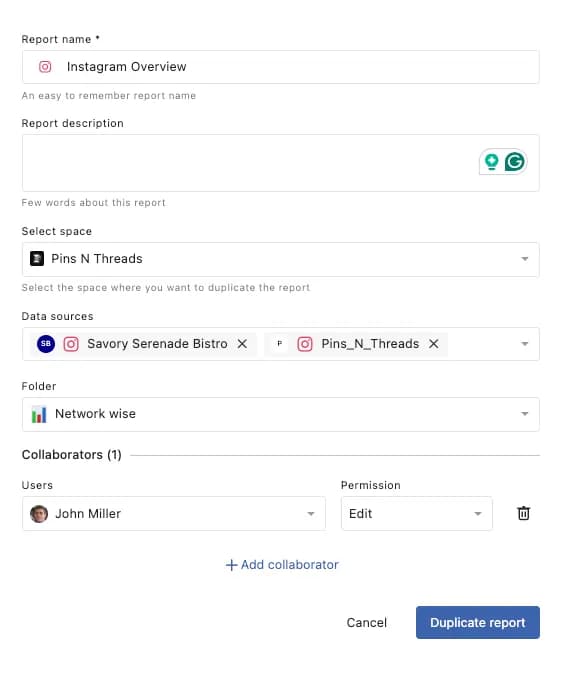
Give the new report a name, and update the Report description
Select a space. You can also duplicate a report to another space if you want the same report across multiple spaces.
Add a Data source.
Add this report to a Folder if you like organizing reports.
You can also add a Collaborator in case you are managing this report with your team member.
When you're done, click Duplicate Report.
The duplicated report will be added to the left panel.