How to Manage TikTok Ad Comments in Engage
Connect your TikTok Ads account to reply to, hide, and moderate comments on your TikTok ad campaigns from the Engage inbox.
Who Can Do This
Connecting a TikTok Ad account requires a Primary Owner, Owner, or Admin role in Statusbrew. You also need to be an Admin in your TikTok Business Center to authorize the connection.
Once the ad account is connected, access to the comments is set per profile:
Engage Full Access lets a user view, reply to, moderate, and assign TikTok ad comments.
View Conversation lets a user see ad comments but not reply, hide, or take other actions.
Ad accounts don't count against your profile limit.
Before You Start: Connect Your TikTok Ads Account
Statusbrew needs your ad account connected to label comments as TikTok Ad Comments and to sync comments on dark ads (which have no organic post). Connect it first:
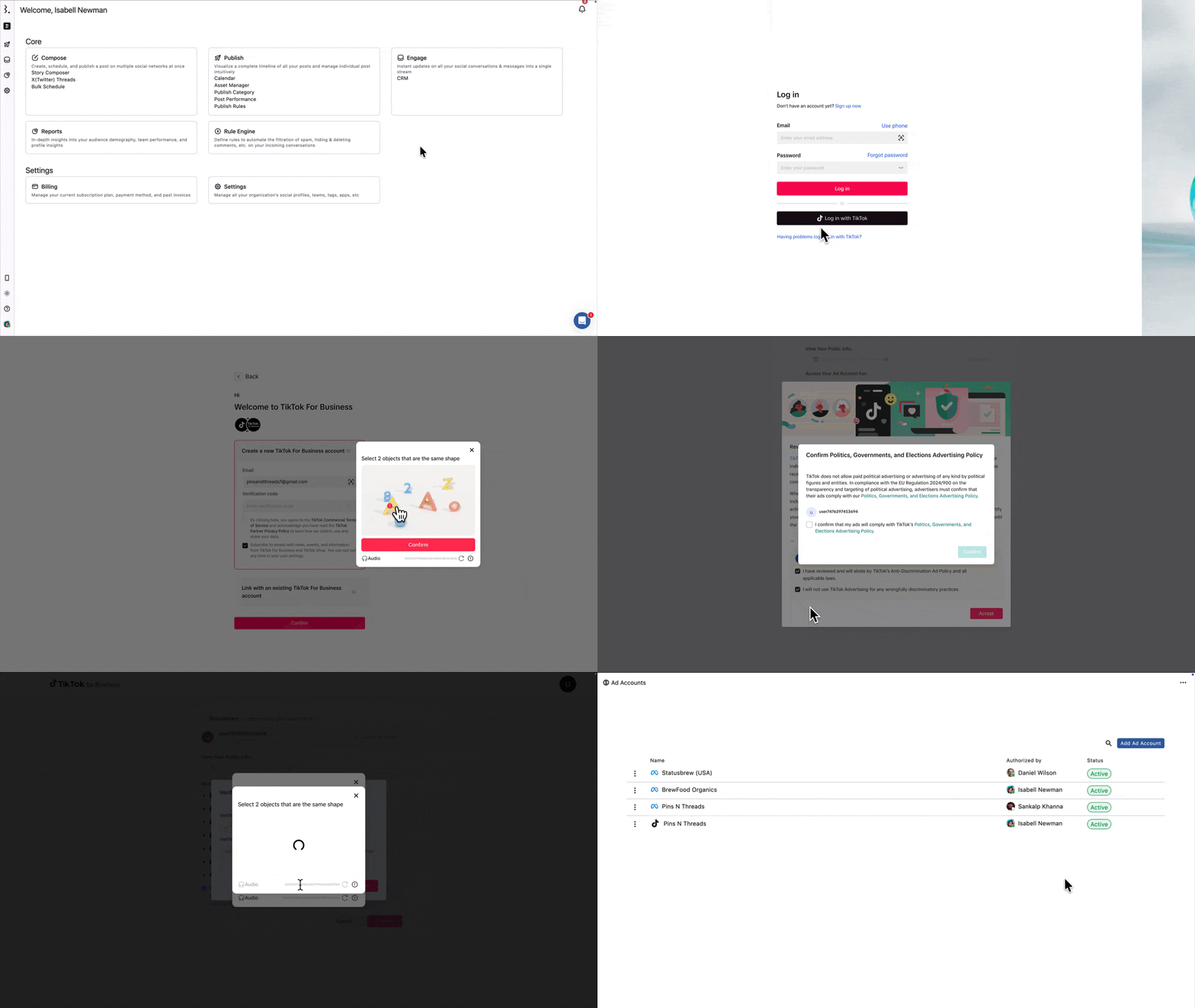
Go to Settings
Select Ad Accounts
Select Add Ad Account
Select TikTok, and you'll be redirected to TikTok
Authorize Statusbrew to access your TikTok account
Choose the TikTok ad account you want to connect and click Submit
To connect your TikTok Ads account, you must be an Admin in the TikTok Business Center. If you're not, request Admin permissions before you start.
Which TikTok Ad Types Are Supported?
In Engage, it shows up as | TikTok ad formats | What that means |
|---|---|---|
TikTok Comment | Spark Pull, Spark Push | These ads run on a visible organic post, so their comments sit with your regular TikTok comments. |
TikTok Ad Comment | Dark Spark Push, Custom Identity | These "dark" ads have no organic post. Their comments arrive as a dedicated ad comment type once your ad account is connected. |
Not synced yet | Smart Plus | TikTok's API doesn't support comment moderation for Smart Plus (AI-powered) campaigns. |
Spark ads are tied to an organic post, so Statusbrew handles their comments like any other TikTok comment. Dark Spark Push and Custom Identity ads have no organic post, so their comments come in under the dedicated TikTok Ad Comment type.
How to Filter Your TikTok Ad Comments
To keep TikTok ad comments in one place, create a View:
Go to Engage
Click (Create view) beside Views in the sidebar. Choose Create Manually
Name the view (for example, "TikTok Ad Comments")
Click Add filter > Conversation type > TikTok Ad Comment > Done
Click Save
Your view appears in the Engage sidebar and updates automatically. To narrow it to a specific TikTok profile, add another filter: Add filter > Profiles and select the profile.
You can also route TikTok ad comments into a Team Inbox automatically with the Rule Engine, using Conversation type > TikTok Ad Comment as the condition.
How to Reply to and Moderate a TikTok Ad Comment
Open the TikTok ad comment from your conversation list. Use your View or Team Inbox to find it fast
Compose your reply (up to 150 characters) in the reply box
Click Reply or Reply & Close
Your replies appear as a single-threaded conversation. You can also add a Macro, insert an emoji, or improve your reply with the AI Assistant.
To hide a comment: hover over it, click (More), and select Hide. Hidden comments appear blurred with a Hidden label, showing who hid it and when.
You can hide a TikTok ad comment, but you can't delete or like it. TikTok's API doesn't support deleting or liking comments on ads.
What Happens After You Reply
Your reply posts publicly on the TikTok ad, under your connected TikTok profile.
If you hide a comment, it's hidden from your audience on TikTok but remains visible to you in Engage (blurred and labeled "Hidden").
FAQs
Why Aren't My TikTok Ad Comments Showing Up in Engage?
TikTok ad comments only sync after you connect the ad account they belong to, and only for comments posted after the account was connected. Make sure the correct ad account is connected under Settings > Ad Accounts, that you have active ads, and that new comments have come in since connecting.
Also, Comments from Smart Plus campaigns do not sync to Engage because TikTok’s API does not currently support retrieving or moderating comments for this ad type.
Are Comments on My TikTok Ads Labeled Differently Before I Connect the Ad Account?
Yes. Comments on Spark ads (which run on a visible organic post) are received in Engage as regular TikTok Comments, whether or not the ad account is connected. Once you connect the ad account, Statusbrew reclassifies them as TikTok Ad Comments.
Dark Spark Push and Custom Identity ads have no organic posts, so their comments only appear after you connect the ad account, and they appear as TikTok Ad Comments from the start.
What Is the Character Limit for Replying to TikTok Comments?
For organic TikTok comments, you can reply with up to 1,200 characters in Statusbrew.
For TikTok ad comments on dark posts, replies are limited to 150 characters due to official TikTok API limitations.
How Often Do TikTok Ad Comments Sync?
In real time, the same as organic TikTok comments.
Can I Automatically Hide Spam in My TikTok Ads?
Yes. Build a rule in the Rule Engine with Conversation type > TikTok Ad Comment as a condition and a Hide comment action, the same way you would for Facebook or Instagram ad comments.
What Happens to My TikTok Ad Comments if I Remove the Ad Account?
Removing an ad account deletes its campaigns from Statusbrew, but the campaigns continue to run natively on TikTok. This is permanent.
Your existing ad comment conversations stay in Engage, but they're no longer labeled as TikTok Ad Comments.
Can I Reply to TikTok Ad Comments With an Image?
No. TikTok ad comments on dark posts currently support text-only replies due to official TikTok API limitations.
Image replies are available for organic TikTok comments, where you can attach one JPG, PNG, or WebP image per reply.