How to export all comments and DMs to CSV (Inbound Message Report)
Engage's Inbound Messages report lists inbound conversations that you can download as a CSV (Excel) file.
This feature is available on all plans.
Admins, Primary Owners, Owners, and users with View Analytics Reports permission for a particular profile/ profile group can access the report.
Steps to download in CSV format
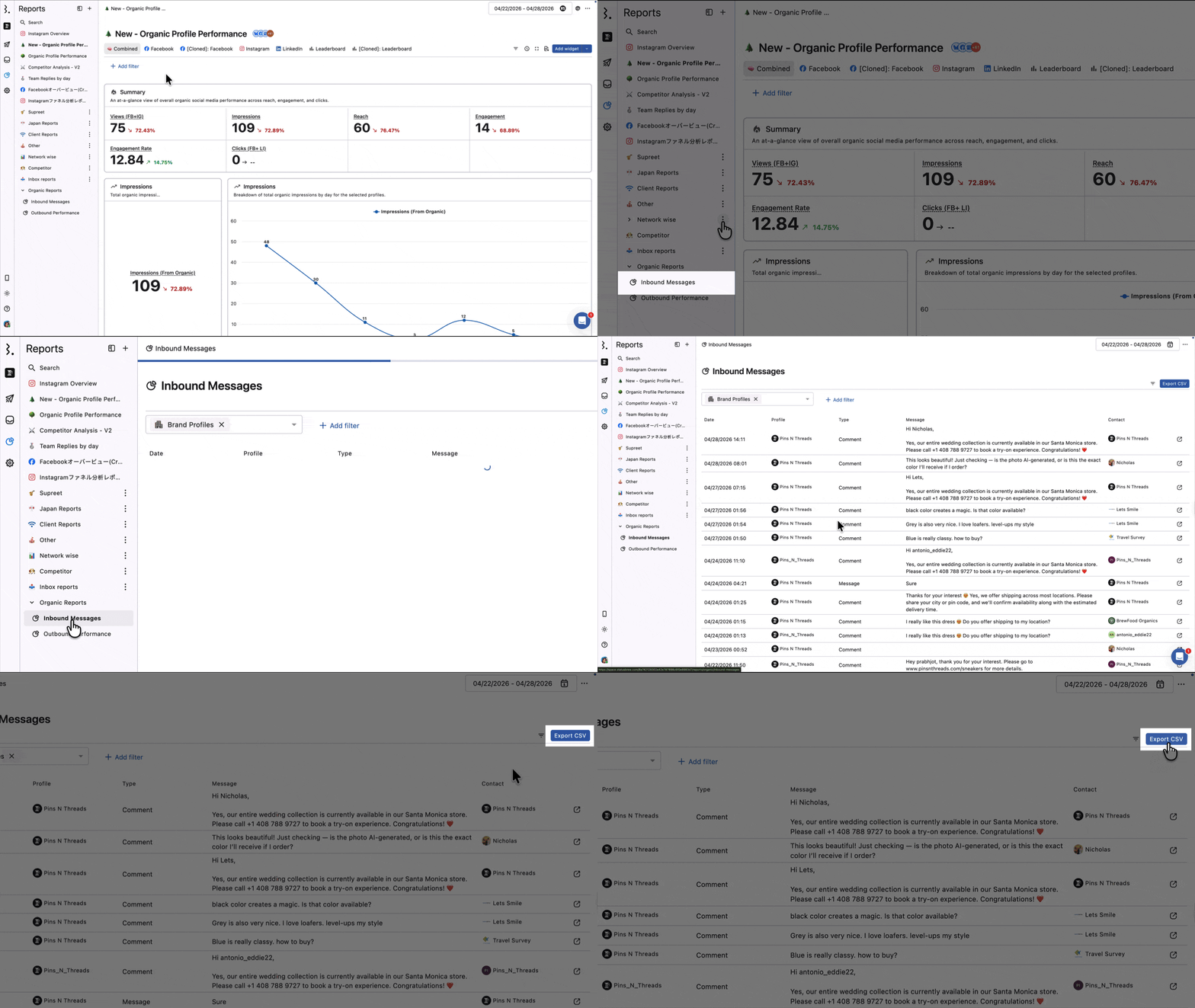
Go to Reports > Organic reports drop-down
In the Organic reports drop-down on the left, click Inbound Messages at the bottom.
Click to view the 200 most recent conversations and check the following:
Date
Profile
Type
Message
Contact
To export all comments and DMs, click Export CSV.
If you want to filter comments to a specific data source, conversation type, language, etc., follow the steps below.
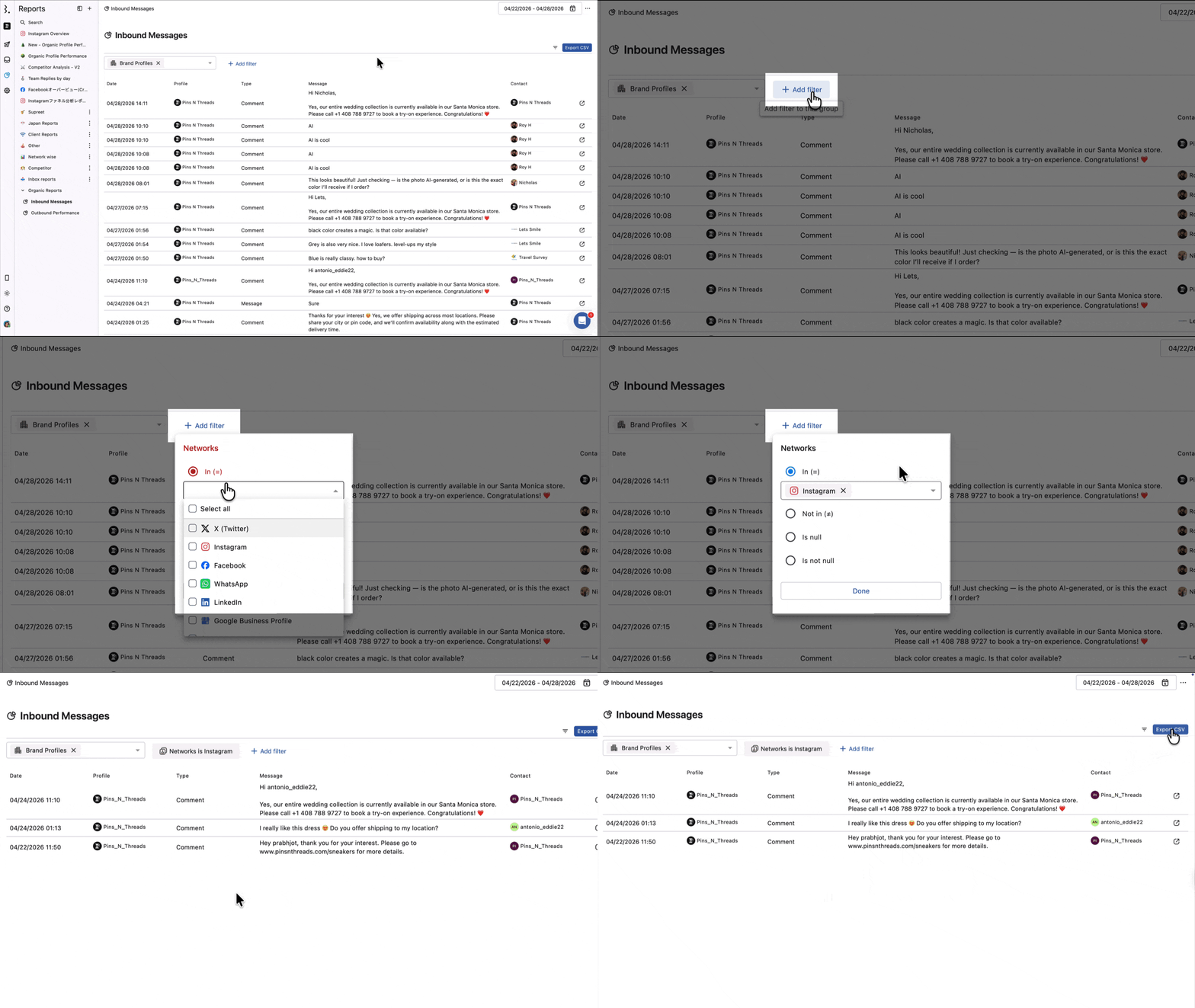
1. Select the social media profile you want to retrieve data from.
2. Click Add Filter to display filtering options.
Network
Message type
Sentiment
Actor
Language
Star Rating
Is Hidden
Is Deleted
Is Brand Message (When this is enabled, it will display only the responses sent by your brand from the Inbox. If you want to include customer messages as well and not exclude your brand replies, you can disable this option.)
Is Paid Engagement
UTM campaign
Tag
3. Select the period for which you want to extract data.
4. Click Export CSV.
This completes the download in CSV file format.
FAQs
Can I Export Ad Comments?
Yes. Use the Is Paid Engagement filter under Add Filter before exporting. This will surface comments from your paid/boosted posts in the CSV.
Can I Export Comments From Prior Months?
Yes. Use the date picker at the top of the Inbound Messages Report to select a custom date range covering the months you need, then click Export CSV.
The Report Only Shows 200 Conversations. Will the CSV Export All of Them?
Yes. The report displays the first 200 conversations. To view the complete list, export the report as a CSV. The export includes 10,000 (max.) conversations for the selected date range and filters.
How Do I Export Comments From a Specific Post?
The Inbound Messages report doesn't have a direct post filter, but there are three ways to scope an export to a specific post.
Option 1: Tag the comments manually in Engage
Use this if the post is already published, and the comments haven't been tagged yet.
Go to Engage and find the post.
Click All at the top of the conversation list to view all comments on that post.
Use the bulk select checkbox to select all comments.
Apply a tag (e.g., "Post: Campaign Name") to all selected comments.
Go to Reports > Organic reports > Inbound Messages.
Click Add Filter > Tag and select the tag you applied.
Click Export CSV.
Option 2: Filter by Post Tag
Use this if the post was already tagged in Publish at the time of scheduling.
Go to Reports > Organic reports > Inbound Messages.
Click Add Filter > Post Tag and enter the tag name applied to the post.
Click Export CSV.
The Post Tag filter shows all available tags. You'll need to know the exact tag name in advance.
Option 3: Auto-tag incoming comments with a Rule
Use this to automatically tag all future comments on a post so you can export them later.
Go to Rule Engine and click Add a Rule.
Enter a name for the rule.
Select the Data Source (profile) you want the rule to apply to.
Under Filter, select Post Tag and choose the Post Tag applied to your post.
Under Actions, select Add Tag and choose the tag you want applied to incoming comments.
Click Save.
Once the rule is active, all new comments on posts with that Post Tag will be automatically tagged. Go to Reports > Organic reports > Inbound Messages, filter by that Tag, and click Export CSV.
This only tags comments received after the rule is created. Comments already on the post won't be tagged retroactively. Use Option 1 for those.
How Do I Export All Conversations From a Specific Network?
Use the Networks filter to scope your export to one or more networks.
Go to Reports > Organic reports > Inbound Messages
Click Add Filter > Networks.
Select the network(s) you want, for example, Facebook, Instagram, or both.
Set your date range and click Export CSV.
Filtering by network returns all inbound conversation types from that network: comments, DMs, mentions, story replies, post replies, reviews, and any other message types connected to it.
How Do I Export Only DMs, Not Comments?
Use the Message Type filter to scope your export to a specific type of inbound message.
Go to Reports > Organic reports > Inbound Messages
Click Add Filter > Message Type.
Select the message type you want to export.
Click Export CSV.
Without this filter, the export includes all inbound message types: comments, DMs, mentions, story replies, post replies, reviews, and any other message types connected to your profiles. Apply this filter first if you only need one specific type.
How Do I Export All Negative Comments?
Use the Sentiment filter to isolate negative messages before exporting.
Go to Reports > Organic reports > Inbound Messages
Click Add Filter > Sentiment
Select Negative
Click Export CSV
Statusbrew automatically detects sentiment on incoming messages. You can also filter for Positive or Neutral sentiment the same way.
How Do I Export Comments in a Specific Language?
Use the Language filter to scope your export to messages in a particular language.
Go to Reports > Organic reports > Inbound Messages
Click Add Filter > Language
Select the language you want to filter by
Click Export CSV
This is useful if you manage profiles across multiple regions and want to review responses in a specific language separately.
How Do I Export Comments That Have Been Hidden or Deleted?
Use the Is Hidden or Is Deleted filters to surface those comments in your export.
Go to Reports > Organic reports > Inbound Messages
Click Add Filter
Select Is Hidden to export hidden comments, or Is Deleted to export deleted ones
Click Export CSV
You can apply both filters together if you need a combined export of all hidden and deleted comments.
How Do I Export Paid Comments From Facebook or Instagram Boosted Posts?
Use the Is Paid Engagement filter to isolate comments from boosted or paid posts.
Go to Reports > Organic reports > Inbound Messages Click Add Filter > Is Paid Engagement. You can combine this with the Networks filter and select Facebook or Instagram to narrow it further. Click Export CSV.
How Do I Export Messages From a Specific Marketing Campaign?
If your links are tracked with UTM parameters, you can filter the export by any UTM value. The report supports five UTM filters: UTM Campaign, UTM Source, UTM Medium, UTM Content, and UTM Term.
Go to Reports > Organic reports > Inbound Messages
Click Add Filter and select the UTM filter relevant to your campaign (e.g., UTM Campaign).
Enter the UTM value you want to filter by.
Click Export CSV.
UTM filters only return results for messages where UTM tracking was present on the originating link.
How Do I Export Conversations Filtered by a Custom Field?
If your team uses custom fields in Statusbrew, those fields appear as filter options in the Inbound Messages report. For example, if you have an Issue Type custom field with values like "Billing", "Shipping", or "Returns", you can export only the conversations tagged as billing-related.
Go to Reports > Organic reports > Inbound Messages
Click Add Filter and select the custom field you want to filter by (e.g., Issue Type).
Select the field value to scope the export (e.g., Billing).
Click Export CSV.
Each custom field your team creates appears as a separate filter option. If you don't see your custom field in the list, check that it has been configured under your workspace settings.
How Do I Export Comments From Last Month or a Specific Date Range?
Use the date picker at the top of the Inbound Messages report to set any custom date range before exporting.
Go to Reports > Organic reports > Inbound Messages
Click the date picker and select your custom date range (e.g., last month).
Apply any additional filters if needed.
Click Export CSV.
The report displays only the 200 most recent conversations on screen, but the CSV export includes up to 10,000 conversations within the selected date range. If you need more than 10,000, split the export across multiple date ranges.
Can I download a list of conversations/comments my team replied to or closed?
The Inbound Messages report doesn't filter by conversation status. To get the actual list, create a custom widget in Reports.
For closed conversations:
Go to Reports and open an existing report or create a new one.
Add a new widget
Select Table chart as the visualization.
Under Value, select Conversation Close Count.
Under Segment, select Conversation.
Save the widget, then export it as a CSV file.
For replied conversations:
Go to Reports and open an existing report or create a new one.
Add a new widget and select Table chart as the visualization.
Under Value, select Conversation Reply Count.
Under Segment, select Conversation.
Save the widget, then export it as a CSV file.
To narrow the results, set your date range and select the relevant Data Sources (profile) or Conversation Type after the widget is created.
The exported CSV includes the following columns for each conversation:
Conversation (Channel) — the profile the conversation came from
Conversation (Text) — the message content
Conversation (Created At) — date and time of the conversation
Conversation (Media URLs) — any media attached
Conversation (Permalink) — direct link back to the conversation in Engage
Conversation Reply/Close Count — count of Replied/Closed Conversations
Note: If widget export is not working, try resetting your local storage. After that, it should work.
Can I search for closed comments by keyword in Statusbrew?
Engage's search bar works across your entire inbox and doesn't filter by state or view.
So searching for a specific keyword within closed comments isn't possible in Statusbrew Engage.
The workaround is to set this up proactively using a Rule and a Team Inbox:
Create a Team Inbox (e.g., "Sales").
Create a Rule that triggers when a conversation contains your target keywords (e.g., "pricing," "how to buy," "share more details") and automatically moves matching conversations to that inbox.
Inside the Team Inbox, you can toggle between Open, Closed, and Snoozed to find exactly what you need.
This way, all keyword-matched conversations are collected in one place, and you can filter by state at any time.
Does the Inbound Report include my replies to customers as well?
Yes. The Inbound Report shows both sides of the conversation — incoming customer messages and your replies. It gives you a full view of all conversation activity, not just what comes in.
How can I see ad comments in reports?
Use the Inbound Messages report and apply the Is Paid Engagement filter.
If you want to see only ad comments, also use Message Type and select the relevant ad comment type, such as Facebook Ad Comments or Instagram Ad Comments.
You can also create a custom widget in an existing report and apply the same filters there.
How can I see comments from a particular ad?
Use the Inbound Messages report and filter by the available ad fields.
You can use:
Is Paid Engagement
Message Type
Ad Campaign Name
Ad Set Name
Ad Name
For example, to see comments from one specific ad or an ad creative, apply Is Paid Engagement, select the relevant Message Type, and then filter by Ad Name.
If you don’t see Ad Campaign Name, Ad Set Name, or Ad Name in your report filters, contact the Customer Success team to enable them by typing “talk to a human” in this chat, and our team will help enable these options.
How can I see or export comments at the ad or creative level?
Yes. Statusbrew now supports that. To see or export comments at the ad or creative level, use filters such as Ad Campaign Name, Ad Set Name, or Ad Name.
These names match the names you set up in your native Ads Manager.
These filters can be used in:
Inbound Messages Report and
Engage views
In Inbound Messages, you can filter by Ad Name and export the matching comments from the report.
In Engage views, you can create a view based on Ad Name to manage comments from a specific ad creative.
Also, make sure you are running ads and that ad accounts are connected with Statusbrew.
Note: You can't get performance-level support based on an ad or creative. That support is not provided yet.
Can I see how many comments a customer sent on a specific ad?
Yes, but you need to use the right method based on the number of comments.
Option 1: Use Contacts for a quick manual check
Go to Engage → Contacts and search for the customer/contact name.
This shows conversations from that contact. This works best when the contact has made only a few comments, so you can manually review them.
The Contacts page does not let you filter whether those comments came from paid ads or organic posts.
Option 2: Use Inbound Messages and export the data
If there are many comments, use the Inbound Messages report.
Apply the relevant filters, such as:
Is Paid Engagement
Message Type
Ad Name
Then export the data as a CSV.
The exported file includes contact details as columns, so you can filter the CSV by customer/contact name and see how many comments that customer has sent on the selected ad.
Option 3: Adding a widget to an existing report
Yes. Ad Campaign Name, Ad Set Name, and Ad Name are supported as dimensions, available only with the Message Count and Conversation Count metrics.
Use Message Count when you want to count individual comments/messages.
Use Conversation Count when you want to count conversation threads.
For example, if you want to see how many ad comments came in for each ad, create a widget with:
Dimension: Ad Name
Value: Message Count
Filter: Is Paid Engagement
You can also use Ad Campaign Name or Ad Set Name as a dimension to group the data at the campaign or ad set level.