ImprovementCompose & Publishing
Smart Crop Now Available — Trim Images To Fit Each Network
Smart Crop is now available in Compose, making it easy to trim images to fit each network's requirements.
AI detects the subject and crops the image to fit each network's specified dimensions.
Cropping instructions can be entered, such as "Keep the person in frame" or "Ensure the logo is fully visible."
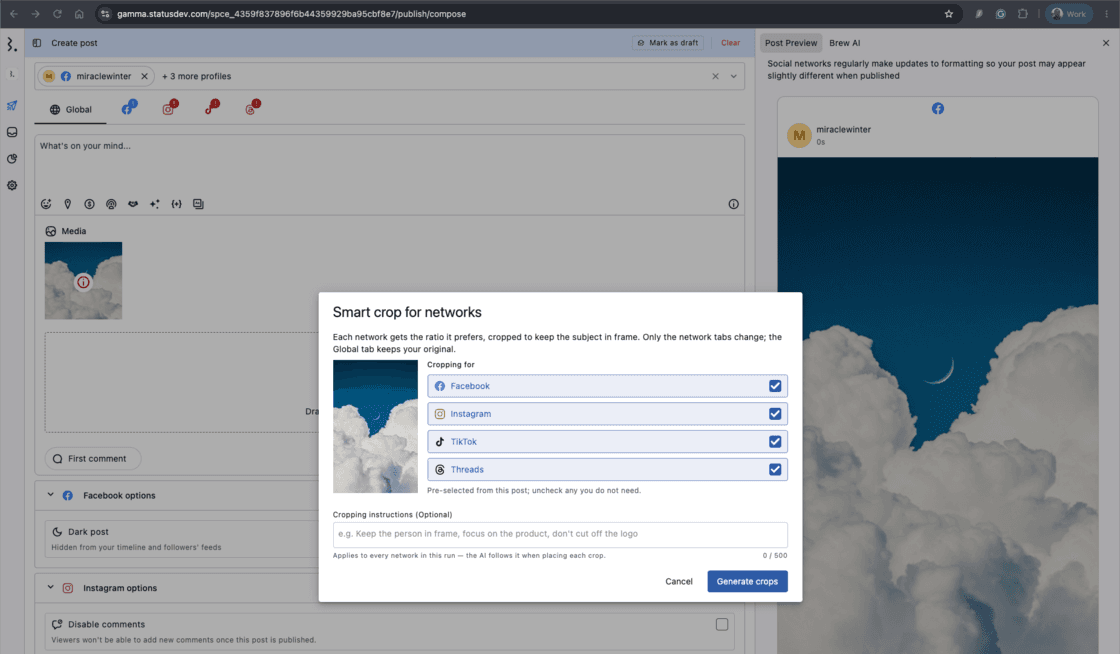
How to use 👉 Compose → Add an image → Hover over the image and click the three-dot menu → Select Smart crop → (Optional) Enter cropping instructions → Click Generate crops → Click Apply crops
After cropping, the adjusted image is applied to each network, while the original image is retained in the Global tab.
Note: Available for photos only. Not supported for X thread posts.