Keyword Matching In The Rule Engine Is Now More Powerful
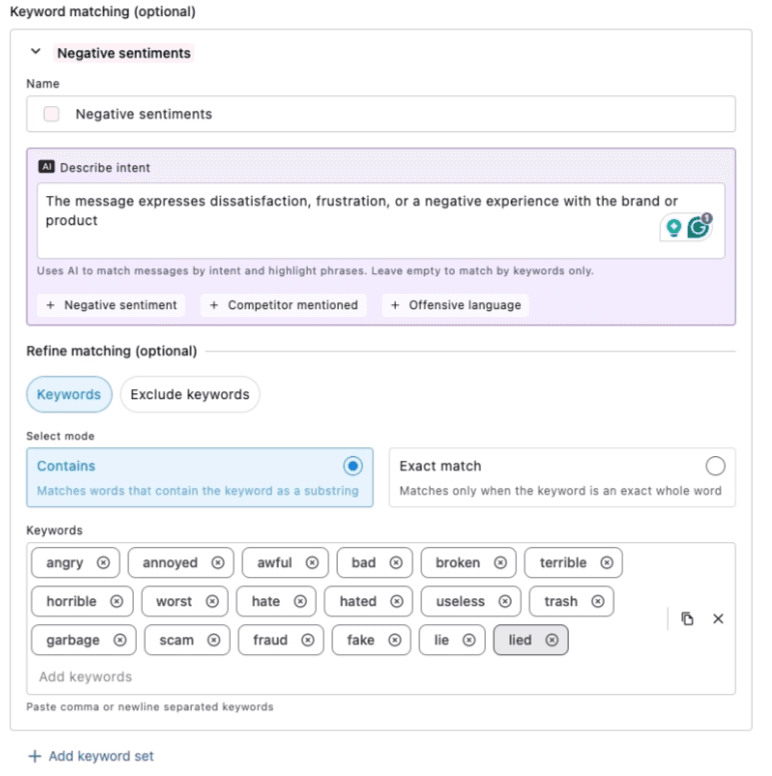
Engage's Rule Engine includes a keyword matching feature for incoming messages. Previously, it only highlighted text in a conversation when it matched a keyword you'd entered. With this update, you can simply "Describe Intent," and AI will find related words, including paraphrased expressions. Words the AI determines to match that intent are highlighted.
Manually entered keywords have their limits. That's why this update introduces intent-based keyword detection — so AI can cover the context and paraphrasing that simple keyword matching would otherwise miss.
Note:
Keywords can still be entered manually as before.
You can now also specify exclude keywords.
Keywords the AI identifies as a match are highlighted separately from regular keyword highlights, so you can tell them apart.
How to set it up 👉 From Engage or the Dashboard → Rule Engine → Add new rule → Keyword matching → Keyword Set → Enter your intent in the AI "Describe intent" field (e.g., "Customer is requesting a refund for a recent order")→ the AI will now evaluate messages against that intent whenever matching keywords are present.